

Highlights

Manage Knowledge Base from the Sidebar

A dedicated Knowledge Base section in the Serval sidebar gives you a centralized place to manage all your connected knowledge sources like Notion, Confluence, Google Workspace, Freshservice, and Zendesk. Control what information Serval’s AI agent uses for faster, more accurate help desk resolutions without leaving your workflow.
  • Sync status filtering: View and manage knowledge items by synchronization state. Filter by ‘All statuses’, ‘Syncing’, ‘Synced’, ‘Failed’, and ‘Waiting’ on both team and application-specific knowledge pages. Folders now show a ‘Failed’ status if any child item has failed to sync
  • Manual sync: Use the Manage sources button to synchronize sources on demand (sources automatically sync every three hours)
251126_Feature - knowledge base on side bar.gif Manually Sync Sources 251126_Feature - kmanage kb sources.gif

Introduce Incident Management

Create, view, and filter incident tickets within Serval to improve visibility and management of critical issues affecting multiple users.
  • Incident ticket type: Manage high-priority issues that affect multiple users
  • AI-powered incident linking: The AI Help Desk Agent intelligently detects when a user’s request is related to an ongoing incident, automatically linking tickets and providing relevant updates or resolutions directly within the conversation
  • Workflow incident creation: Create incident tickets directly from your automated workflows alongside standard request tickets
  • Filter incidents: Use Ticket Type to filter for all incidents
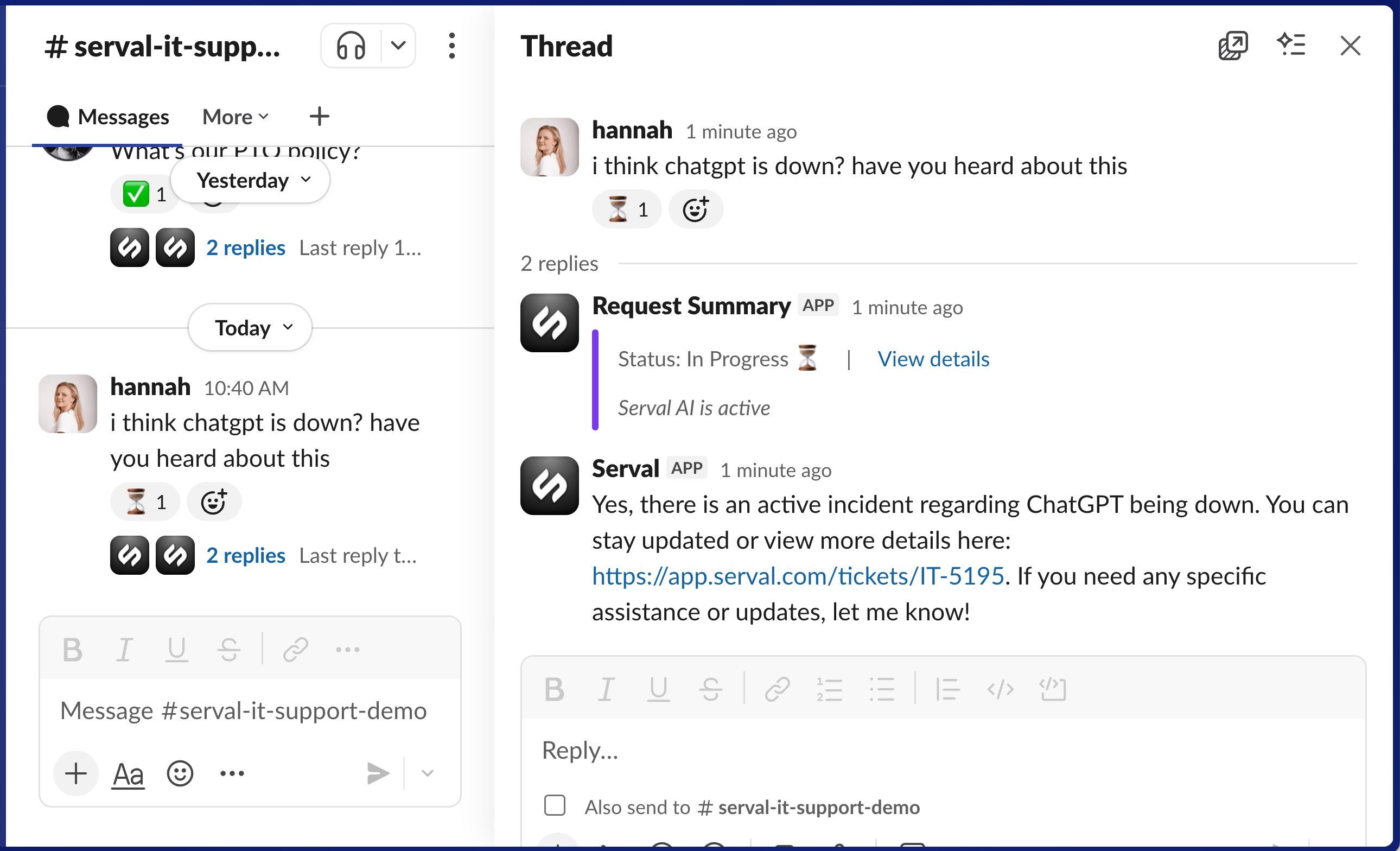
For example, when multiple employees report that Cloudflare is down, Serval detects the pattern, creates an incident ticket, and automatically links all related requests. If another user asks about things like ChatGPT is down, the help desk agent can link to the original incident ticket and know that this is likely because Cloudflare is down. 251126_Feature - incident type.gif Ask Serval to Build an Automation Directly from a Ticket Screenshot 2025-11-26 at 10.41.37 AM.png

Enhance AI Suggestions with Workflows

Serval’s AI Help Desk Agent now suggests creating custom workflows, installing pre-built workflows from the library, and connecting new applications to unlock further automation. This moves beyond guidance suggestions to proactive recommendations that expand your automation capabilities.
  • Finding suggestions: Review and approve suggestions both by clicking “Suggestions” in the top right corner of Guidance or in Workflows
  • Workflows and suggestions: Ask Serval to suggest workflows by tagging @Serval and requesting a specific automation, such as “please suggest a new workflow to add a user to a private channel”
For example, after Serval couldn’t send emails to Ashby candidates, Serval suggests creating a workflow to send emails to Ashby candidates with guidance around when to do so. You can edit and approve this workflow before publishing. 251126_Feature - workflows in suggestions vSMALL.gif

Tag Users in Guidance

Mention specific users directly within your guidance documents by typing @ and selecting their name from a list. This creates clearer, more personalized instructions in your team’s knowledge base, making it easier for Serval’s AI and human agents to reference relevant individuals when providing support. This ensures the right people are automatically looped in on relevant requests without manual handoffs. For example, tag @Sarah Kramer in guidance about security exceptions so the AI agent knows to loop her in on relevant requests. 251126_Feature - tag in guidance.gif

Enable AI Agent to Remain Active After Escalation

Serval’s AI agent can now remain active on a ticket even after it has been escalated to a human agent. Previously, the AI would disengage upon escalation. With this change, the AI continues to provide relevant guidance and support alongside your team, ensuring continuous assistance throughout the ticket’s lifecycle and reducing resolution time.

Integration Updates

[New] Firstbase Automate hardware lifecycle management with Firstbase, a platform for procuring, deploying, and managing IT equipment globally. This integration streamlines device onboarding, retrieval, and redeployment for remote and in-office teams. [New] CRXplorer Analyze Chrome extensions for security vulnerabilities, permissions risks, and malware with CRXplorer. This integration enables automated extension scanning workflows to monitor browser security across your organization. Jira Integration Updates Improved Jira integration. Serval intelligently converts headings, lists, code blocks, and inline styles between Jira’s native format (ADF) and Markdown. Freshservice Integration Updates Improved reliability of ticket assignments for Freshservice integration. This update refines the logic for assigning tickets to users within Freshservice, ensuring that tickets are consistently and correctly routed to the designated agents.

Platform Updates

Sync Tickets to New Team Channels Automatically When a ticket is moved to a new team, all configured channels now automatically sync with that ticket. However, Serval follows the syncing configuration for the new channel. So if syncing is turned off in that new channel, Serval will not sync. For example, if a ticket is moved from IT to HR, the Jira team associated with HR will now ingest this ticket. This ensures ticket visibility across all relevant systems without manual intervention.