

Overview
An approval procedure is a sequence of steps. Each step is sent to one or more approvers, and you decide per step whether all must approve or any one can approve. Within a step, an approver can be:- A specific user
- A group, optionally with a quorum, such as “4 of 8 must approve”
- The requester’s manager
- A custom approval workflow that decides automatically based on your own logic, or escalates
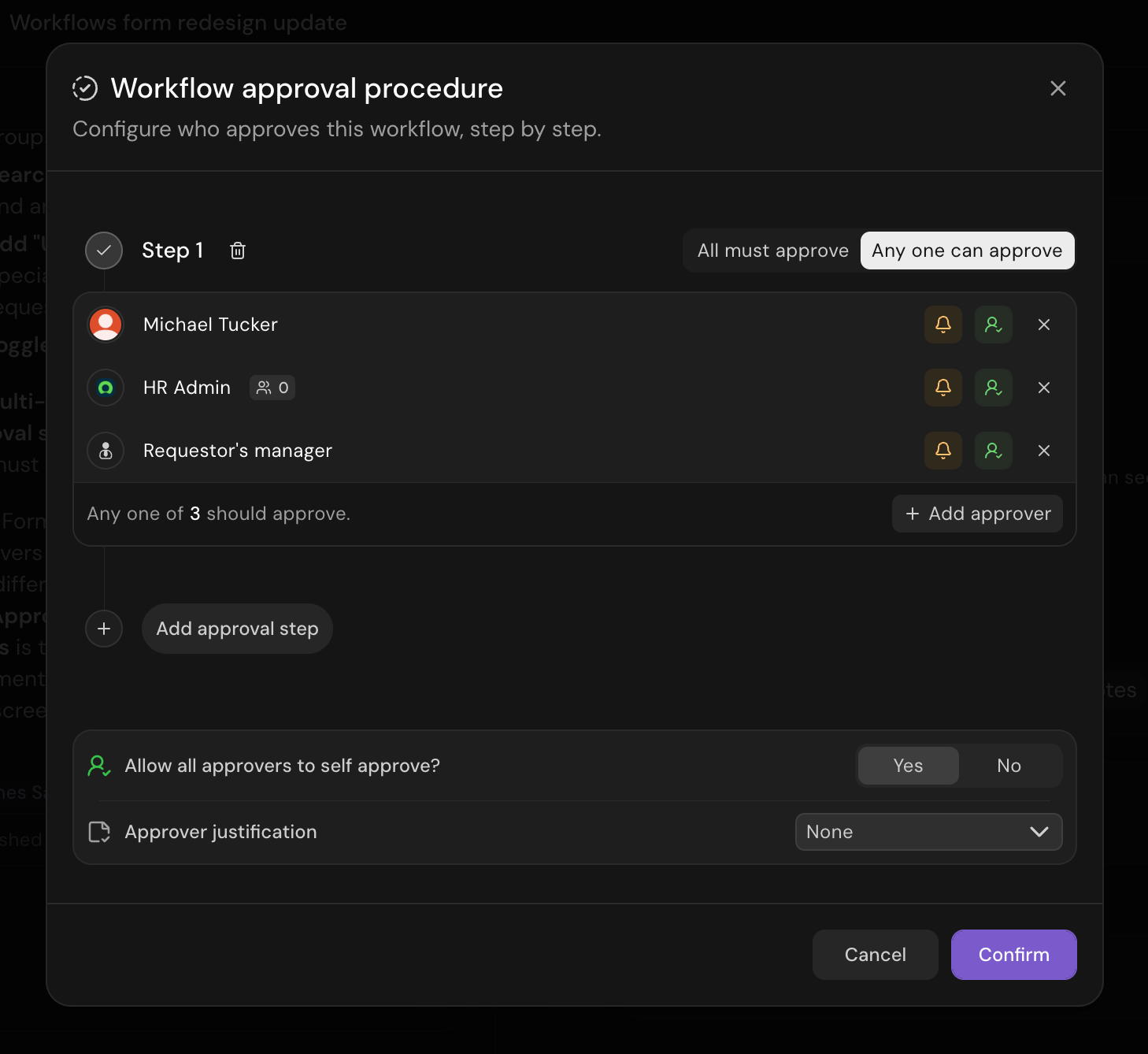
A workflow approval procedure, built as a sequence of steps
Add approvals to a workflow
Approvals appear as a Get approvals step in the workflow. On a new workflow (on-demand or form-submit triggers), click Add Approvers above the workflow to create the first step. Once steps exist, the Get approvals node summarizes its approvers, and selecting it reopens the builder. Both open the Workflow approval procedure dialog, where you configure who approves the workflow, step by step.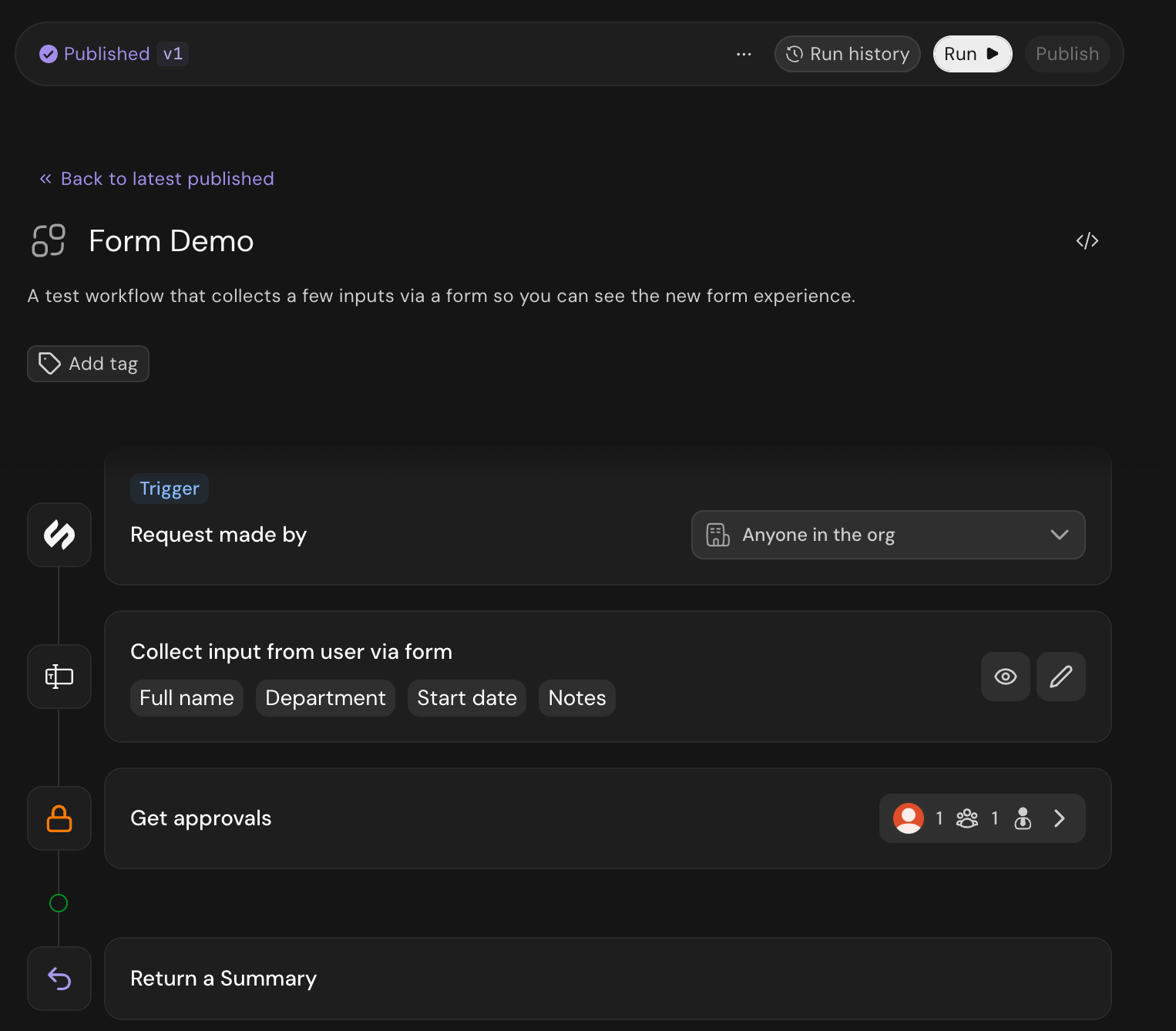
The Get approvals step in a workflow
Build the steps
- Click Add approval step and pick the approvers for that step. A single step can mix several approvers: specific users, groups, and the requester’s manager.
- If a step has more than one approver, choose All must approve or Any one can approve.
- For a group with two or more members, set a quorum: the number of members who must approve. The step then reads as N of M must approve.
- Add more steps for sequential approval. Steps run in order, and each begins only after the previous one completes.
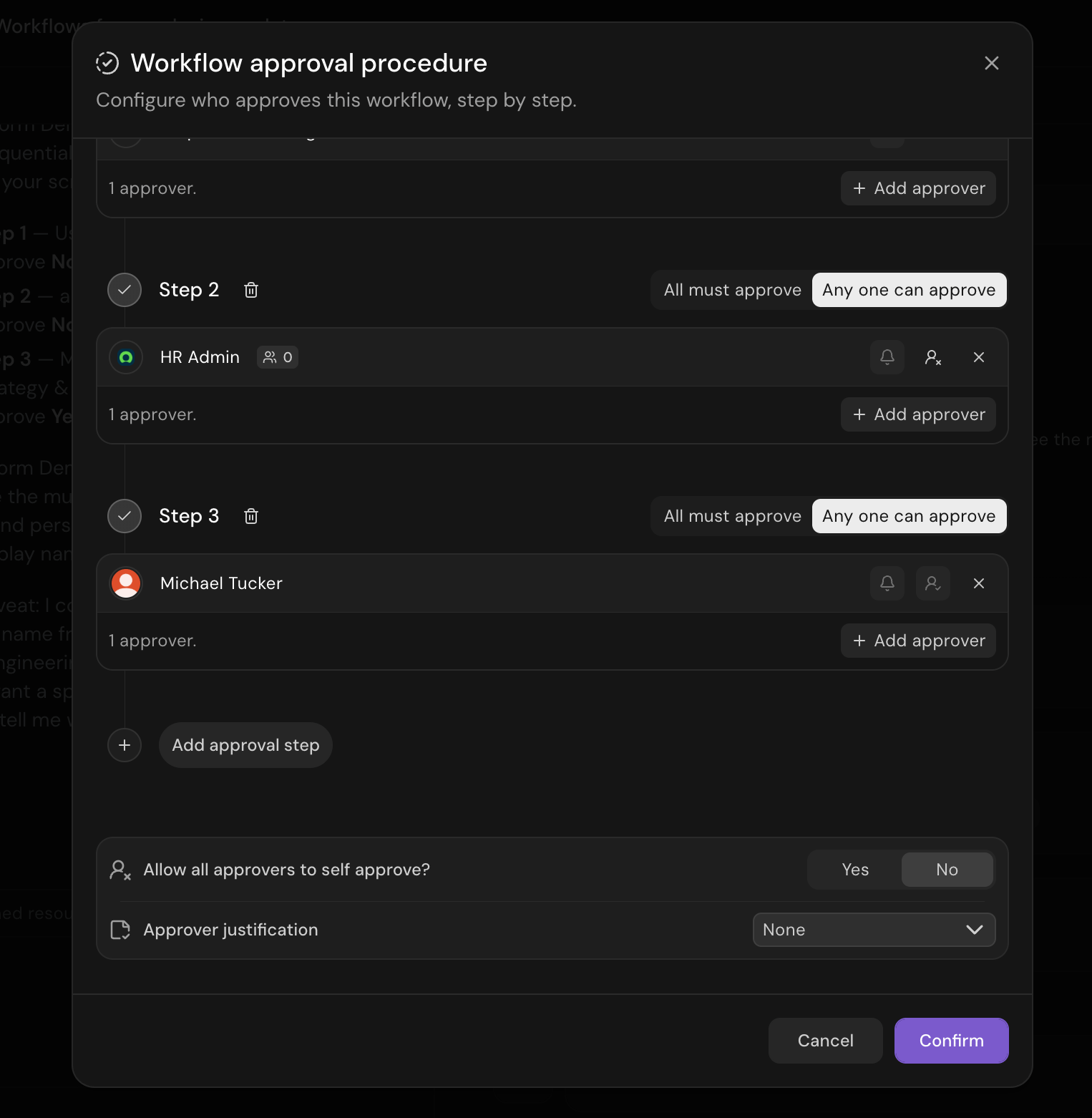
A multi-step approval procedure
Notified vs. backup approvers
Each approver in a step is either notified or backup:- Notified approvers are alerted when the step is pending and count toward satisfying it.
- Backup approvers aren’t notified but can still step in and approve.
Remind pending approvers
After an approver has been waiting for 24 hours, anyone who can reply to the request’s ticket can select Remind on the approval card. People with override permission also see Override. Outside a ticket, reminding requires override permission. Serval posts a short reply beneath the approver’s original Slack approval message. The original approval buttons continue to work. This action currently supports Slack only. Reminders respect approval notification preferences and only reach approvers who are still waiting to decide. After a reminder is sent, the request has a shared 24-hour cooldown and the sender is recorded in the audit log. If no original Slack approval messages are available, a toast explains this and you can retry without waiting a day.Approver justification
Approvers can be asked to record a note when they decide. Set Approver justification to None, Optional, Required, Required to approve, or Required to deny. The approver enters the note when they approve or deny, and it’s captured wherever they act (Slack, Microsoft Teams, and the Serval inbox) and stored with the decision.Self-approval
Control whether an approver can approve their own request. Toggle it per approver, or set Allow all approvers to self approve? for the whole procedure. When a step has a single approver, self-approval stays on so a request they submit isn’t left stuck.Mid-run approvals
A workflow can pause partway through to collect an approval, rather than only gating before it starts. When the workflow reaches a Get approvals step, it holds until an approver responds, then resumes automatically. If an approver denies the request, the workflow stops.- Approve at the right moment: Run initial steps first, then request approval only when the workflow reaches a decision point.
- Respond anywhere: Approvers respond in Slack, Teams, email, or the Serval web portal, and the request appears in their inbox.
- Choose who approves: Route to a specific user, a group, or the requester’s manager, and chain multiple approval steps together.
Delegation
Approvers can delegate their approval authority to another user or group, so requests keep moving when an approver is out. Delegation covers workflow approvals, access-request approvals, and ticket assignments.- Set rules in user settings: Configure delegation from a user’s settings, not a workflow’s approver dialog. Each rule names the delegator and one or more delegates.
- Delegate to a user or a group: Route delegated approvals to a specific person or to any member of a group.
- Route automatically: When an approval would go to the delegator, Serval sends it to the delegate instead, with no manual reassignment.
- Also applies to ticket assignments: When a ticket would be assigned to the delegator, Serval routes it to their delegate instead.
- New approvals and assignments only: A delegation rule applies only to approvals and assignments that start after the rule is active. Anything already assigned to the delegator stays with them.
- Set an active window to the hour: A rule’s start and end include a time of day, not just a date, and display in each viewer’s time zone. A rule past its end shows an Expired badge and stays editable.
- Keep a clear audit trail: The approval timeline shows who delegated and who made the final decision.
- Manage through the API: Create and manage delegation rules with the Serval public API.
Delegation rules route approvals to someone you choose in advance. To unblock a request in the moment, a role with the Override approvals permission can approve or deny the current step of any of the team’s approval requests without being an assigned approver. Every override is recorded in the audit log.
Delegating a single request
If your team has this turned on, a pending approver can hand their seat on one request to another person. That person’s approval counts as the original seat. You do this from the web approval actions on the ticket, workflow run, or inbox row, not from Slack, Teams, or email.- Pick one person: The delegate must be an active user in your organization. You can’t pick yourself, someone who already has a seat on the step, or the person the request is for, even when self-approval is on. Someone who submitted the request on another person’s behalf isn’t excluded for that reason alone.
- Custom approval workflows: You can’t delegate a step configured to use a custom approval workflow, including when that workflow selects human approvers. Ordinary inline approval steps inside the workflow can still be delegated.
- Approval authority transfers: After you delegate, you can no longer approve or deny that seat. The delegate can approve, deny, or hand the seat on.
- Notifications follow the seat: Your pending approval notification updates to delegated. The delegate gets a new approval request. Email already sent to you isn’t retracted. Its links can’t record a decision unless you hold a current seat on that step.
- Audit trail: The approval timeline still shows who the seat started with and who you handed it to.
Best practices
- Use groups with a quorum for scalability: Instead of listing individual users, add a group and set how many of its members must approve, so approval keeps working as the team changes.
- Pick the right step rule: Use Any one can approve when any qualified person can sign off, and All must approve when every named approver is required.
- Use manager approval for hierarchical sign-off: Add the requester’s manager as an approver when a request needs a reporting-line decision.
- Add backup approvers for coverage: Include backup approvers on a step so someone can still act when the notified approver is unavailable.
- Require justification for sensitive steps: Set approver justification to Required on high-impact steps to capture why each decision was made.
- Review self-approval carefully: Decide whether approvers should be able to approve their own requests based on your security requirements. When a single user is the only approver on a step, keep self-approval on so a request they submit isn’t left stuck.