

Highlights

Redesigned Ticketing Interface

The ticketing interface has been rebuilt on a new visual foundation. The redesign improves information density, makes queues easier to scan, and renders correctly at any screen size. It also ships the first production components from Serval’s 2026 design system, which will continue rolling out across the product in upcoming releases.
View updated Slack cards with progress indicators Slack cards for ticket and workflow activity have been updated with clearer structure and inline progress indicators. More context surfaces in the card so users can act without leaving Slack.
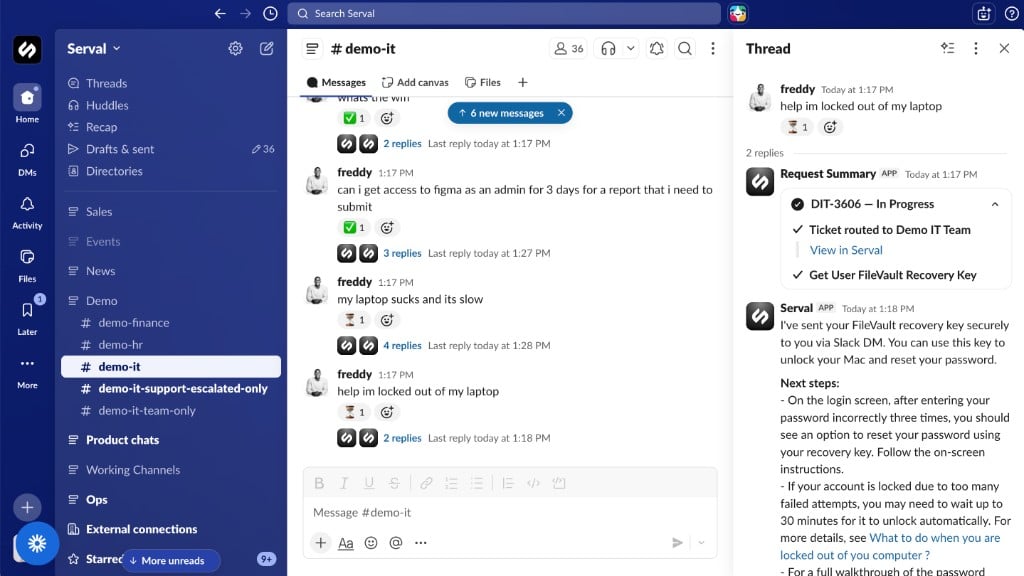
Slack thread with a Serval Request Summary card showing ticket status and inline workflow progress steps

Trigger Workflows from SLA Events

You can attach workflows to SLA definitions so automations run from your SLA configuration without separate wiring. Those actions are time-based only: each one fires at an offset from the SLA breach time (before the breach, exactly at breach, or after). They are not tied to other ticket events such as messages or status changes. Use this to escalate to a manager as the clock runs down, alert a Slack channel before time expires, or reprioritize tickets automatically ahead of breach. For example, configure a workflow that pings the on-call channel 30 minutes before a critical ticket breaches SLA and assigns it to the team lead if no one has responded yet.

Install Multiple Workflows at Once with Bundles

Workflows in the catalog can now be grouped into bundles and installed all at once. Instead of adding each workflow individually, install a complete set — all onboarding workflows, all access management workflows, all integrations for a given tool — in a single action. This makes it faster to set up a new team, deploy a standard automation suite across your org, or get started with a new integration’s full workflow library.

Customize Approval Follow-Ups with the Approvals API

The Approvals API now lets you define what happens after an approval resolves. When a request is approved or denied, you can trigger a workflow, provision access, send a notification, or push the outcome to an external system — based on the decision, who made it, and any data submitted with the request. This is useful for chaining approval workflows together, triggering provisioning only after a specific approver signs off, or building approval-dependent automations that connect Serval to other tools in your stack.

Connect Coupa to Serval Workflows

Coupa is now a native Serval integration. Connect it to build workflows that read from and write to Coupa, route procurement-related requests, and incorporate Coupa approval data into help desk automations. Teams that use Coupa for procurement and finance can now handle related IT requests — vendor access, license provisioning, cost center routing — directly through Serval.

Manage Organization Security Settings

Under Organization SettingsSecurity, org admins configure SSO (connection status, domain verification, and the Require SSO toggle), SCIM for user and group provisioning from your identity provider, and the domain allowlist with domain filtering so only matching email domains are in scope when people sync from connected directories and integrations. See Organization security settings for paths, each control, and how enforcement works. This release adds Enforce Domain Filter at the bottom of the domain allowlist card. Configure allowed domains, save, then use Check Users to dry-run who would be deactivated. The dialog shows counts and affected people before you commit. Confirm there to deactivate every non-matching user in one action. The signed-in admin is never deactivated. Users removed by enforcement stay deactivated while domain filtering stays on; they cannot be reactivated until policy changes allow it. For example, an IT admin cleaning up access after an acquisition can preview which contractor accounts fall outside the approved domain list, review the results, and deactivate them all without touching each account individually.

Installable Workflows

Add users to Slack channels from the workflow catalog A new installable workflow lets you add a user to a Slack channel directly from Serval. Previously only available in the admin app, this workflow is now in the standard catalog for all users.

Integrations

Connect Spotify to Serval workflows Spotify is now available as a native integration. Build workflows that control playback, search tracks, and manage playlists from Serval. See the Spotify integration docs for setup. Connect Coupa to Serval workflows See Highlights above.

Platform

Filter MCP tools dynamically Administrators now have more control over which MCP tools are exposed in a given context with dynamic MCP filtering. Create and list messages via the public API New public API endpoints support creating and listing messages on tickets programmatically. Use them to post to ticket threads or pull message history from integrations and reporting tools without using the web app.