

Organization settings
Access organization settings by switching to the Organization workspace in the sidebar’s workspace switcher, then selecting Settings.Only Org Admins can access organization settings.
Users
Manage everyone in your organization:- View all users and their org roles (Member or Admin), split across Users and Deactivated tabs
- Invite new users
- Deactivate users one at a time, or select several and deactivate them in bulk
- On the Deactivated tab, select several users and reactivate them in bulk
- Change organization roles
Teams
Create and manage teams:- Create new teams with a name and prefix
- View team membership
- Delete teams
Groups
Organize users into groups for easier management:- Create groups
- Add/remove users from groups
- Use groups for assignment rules, assignment groups on tickets, and access policies
Branding
Personalize how Serval looks and what it calls its AI assistant across your organization. Open Organization Settings → Branding. Organization URL The read-only sign-in URL for your organization, with a copy button so you can share it with your team. Once your organization has moved to this URL, ticket and notification links that identify your organization open here. Older app.serval.com and app.eu1.serval.com links without organization information keep you on that host after sign-in. Opening the link again can reuse your session. You may need to sign in once on each host. Help Desk Agent Set the name and logo for the AI assistant that appears in tickets and conversations. A Let teams set their own agent name toggle lets individual teams replace the organization name with their own. Turning it off returns every team to your organization’s name, and each team’s choice is remembered, so turning it back on restores their previous names. The assistant also uses this name when it refers to itself in messages to requesters, such as the “If you need me again, just mention …” line after an escalation, on every channel except Slack. In Slack it @-mentions your Slack app, so Slack shows the app’s display name. Application branding Set the name (it defaults to Serval) shown next to the logo in the sidebar, on the sign-in screen, in the end-user portal, and on the hosted form pages people open from a shared form link, and upload light and dark mode logos. If you upload only one logo, Serval uses it for both themes. Changes take effect once you save. Serval never removes your ability to clear a field and return to the default.New Request page
Choose which cards employees see on the New Request page, where they start a request in the web app. Open Organization Settings → New Requests, then toggle each card:- Request access card shows the entry point for requesting role-based access to applications.
- Service catalog card shows the catalog of predefined services and forms employees can submit.
- Knowledge base card shows the link to browse published knowledge articles.
Security: SSO, SCIM, domains, and data redaction
A guided in-product setup for both SCIM and SSO is found within Organizations → Security.
SSO
- Connect and review SSO for your identity provider (SAML via WorkOS).
- Confirm domain verification and overall SSO configured status from the card.
- Use Require SSO when everyone must sign in through your IdP.
If your sign-in domain belongs to more than one organization that enforces SSO, you choose which organization to sign in to, then Serval redirects you to that organization’s identity provider.An SSO session can open another organization that doesn’t require SSO only if Serval recognizes the issuing provider as an SSO provider for your email domain. Otherwise, sign out and use a different sign-in method for that organization. An SSO bypass still lets you use your organization’s own identity provider.To switch organizations, choose Logout from your profile menu and sign in to the organization you want to open.If Serval asks you to sign in again when opening an organization, sign out and start a fresh sign-in. Refreshing an older session does not replace this step.
WhatsApp sign-in
WhatsApp sign-in is rolling out to selected organizations. An organization admin can configure it when WhatsApp sign-in appears under Security → Sign-in methods.- Open the management team’s Twilio connection in Integrations.
- Open Settings and scroll to WhatsApp sign-in delivery at the bottom.
Enter the WhatsApp sender number with its country code, such as
+1234567890, and the Magic-link template Content SID from your approved Twilio template, such asHX0123456789abcdef0123456789abcdef. Serval fills the template’s first variable with the sign-in link. Select Save settings. - Follow Security settings. The Ready status means delivery is configured. Not ready means delivery isn’t ready or its readiness couldn’t be checked. Use Set up Twilio connection to review setup.
- Once the status is Ready, enable WhatsApp sign-in. The toggle is disabled while sign-in is off and delivery is Not ready. You can still disable sign-in if delivery becomes unavailable after enabling it.
- Use List User Phone Numbers to find the current record. Check its
e164,isPrimary, andlabelfields instead of relying on list order. - Use Set User Phone Login Trust with
phone_number_idandverifiedForMagicLinkLogin: true. An organization API key needsusers:manage; team API keys and workflow workers can’t grant login trust. - To revoke trust, send the same ID with
verifiedForMagicLinkLogin: false.
serval.common.listUserPhoneNumbers({ userId }). Workflows cannot grant or revoke login trust.
The phone_number_id is the same ID returned in the user’s phone number records. Listing the current record before granting trust prevents a stale request from trusting a replacement number.
Trust belongs to the user’s exact phone number record. Removing and re-adding a number requires a new grant. When directory sync replaces or clears a primary number, it removes the old number from the user’s phone numbers and revokes its login trust. If the replacement number belongs to another user in your organization, Serval still removes the old number but leaves the replacement unassigned. Other secondary numbers remain available. Manually choosing another primary number preserves existing grants.
You can list phone numbers and revoke login trust for deactivated users. You can’t grant them new login trust. Reactivating a user doesn’t restore trust that you revoked.
Revoking trust prevents new sign-ins, including completion of links issued before revocation. It doesn’t end existing browser sessions.
Directory sync also clears messaging verification for the removed number. The removed record cannot receive a new verification grant; adding the number again creates a new, unverified record. Messaging verification is separate from login trust and expires automatically.
Session timeout
Set how long a sign-in may sit idle before Serval signs the user out, under Session timeout on the Security page. The setting applies to every member of your organization.- Choose a duration from 1 hour to 30 days. The default is Never: sessions stay signed in until the user signs out.
- Activity means any request the user’s browser makes to Serval. A tab left open counts as idle once the person stops interacting with it.
- An idle session is revoked on its next request or token refresh, and the browser signs itself out with a notice on the login page. Signing in again starts a fresh session.
The timeout is a ceiling on inactivity, not a fixed session length. Shortening it applies immediately to sessions that are already idle for longer than the new value.
Data redaction
Enrolled organizations can add custom credential patterns under Security → Data redaction. Organization Admins preview expressions against sample text, then save them disabled or enable them across the organization’s help desk teams. See Data redaction for supported patterns, scope, and propagation timing.SCIM
SCIM keeps your IdP and Serval in sync for users and groups, via WorkOS Directory Sync. Supported providers include Okta, Microsoft Entra ID (Azure AD), Google Workspace, JumpCloud, OneLogin, Rippling, and other SCIM-capable IdPs. What SCIM controls:- Creates and deactivates Serval user accounts as people are added to or removed from your IdP. A user your IdP deactivated stays deactivated until your IdP re-provisions them or an org admin reactivates them. User syncs from other connected integrations can’t reactivate them.
- Imports your IdP’s group list into Org Settings → Groups.
- Sets each user’s organization-level role — Org Admin or Org Member — based on the WorkOS role slug computed for them. The most common pattern is to map a dedicated IdP group (such as
serval-admins) to theadminrole in the WorkOS dashboard for the directory connection. See WorkOS Directory Sync — Roles for the dashboard steps. - Links a person’s alternate email addresses to a single account, so someone reachable at more than one address is never split into duplicate users. See Email aliases below.
Email aliases
Some people are reachable at more than one address — for example a full-form mailbox (jane.doe@company.com) and a short-form or UPN (jdoe@company.com). To keep them as one Serval account instead of a duplicate per address, send every address in the standard SCIM emails array on the User resource. Mark exactly one entry primary: true and the rest primary: false:
primary address as the account’s email and treats the others as aliases. A request or message that arrives from any of them — email, Slack, the help widget, or a connected integration — is attributed to the same person, and no new account is created. Each user’s aliases are listed on their profile under Identity aliases.
Aliasing keys on the addresses your IdP sends in
emails, so it only covers addresses present in the SCIM payload. Set exactly one address as primary — that value becomes the account email shown throughout Serval. Contact Serval to enable identity aliasing for your organization.User Sync Domain Allowlist
- Turn domain filtering on or off for your organization.
- Add allowed domains so only matching email addresses stay in scope when users sync from connected directories and integrations.
Enforce domain filter
After allowed domains are saved, Enforce Domain Filter appears at the bottom of the domain allowlist card.- Click Check Users to run a dry run. Serval lists which users would be deactivated because their email does not match the allowlist.
- Review the dialog. The admin running the check is never included in deactivation.
- Confirm to deactivate all non-matching users in one step.
External Requester Domain Allowlist
This allowlist controls who can become an external requester — someone outside your organization who reaches your help desk and does not yet have a Serval account. It applies on every channel that creates a requester on first contact: email intake, Slack, Microsoft Teams, and connected ticketing integrations such as Jira, Linear, Zendesk, ServiceNow, Freshservice, and Salesforce. When filtering is on, a first-time sender from an unlisted domain gets no guest account, and therefore no ticket. This applies even if a team marks that domain as trusted in its own email settings, so the org policy is the outer boundary. The check runs once, when the account is created. Requesters who already have a guest account keep filing tickets even if you later remove their domain, and removing a domain never deactivates anyone. To cut off an existing requester, deactivate the user directly under Org Settings → Users.Organization members are not affected by this allowlist. They are governed by the User Sync Domain Allowlist above.
AI Response Domain Allowlist
This allowlist controls which external requesters Serval AI replies to, separately from whether they can file at all. When filtering is on, a requester from an unlisted domain still gets a ticket, and your team still gets notified — Serval simply withholds the AI response and routes the ticket to a human. Unlike the requester allowlist, this is checked live on every message, so edits take effect on the requester’s next message with no sweep. Use the two together to admit a domain but keep Serval quiet with them: add the domain to the External Requester Domain Allowlist and leave it off the AI Response Domain Allowlist.Organization members always receive AI responses. This allowlist applies only to external requesters.
API keys
Manage programmatic access to Serval:- Create API keys with a name and an expiration (1, 7, 30, 60, 90, or 180 days, or 1 year). Every key must expire, and 1 year is the maximum.
- Client secrets start with
svl_secret_followed by a type tag (pkfor API keys,wkfor self-hosted worker keys,mkfor svmeta worker keys) and 49 alphanumeric characters, for examplesvl_secret_pk_…. Point your secret scanner atsvl_secret_(pk|wk|mk)_[0-9A-Za-z]{49}. Keys created before this format existed keep working unchanged. - Optionally scope a key to specific permission bundles (for example,
tickets:readorworkflows:run) so it can only reach the endpoints those bundles cover. A key created with no scopes has full access. - Optionally restrict a key to specific teams so it can only reach resources on those teams. Leave the team list empty to allow all teams.
- Review a key’s configuration, and revoke keys you no longer need
Audit logs
View a record of actions taken in your organization:- Filter by user, action type, or date range
- Export logs for compliance
- Approvals: approve, deny, timeout, automatic conclusion, and cancellation of approval requests
- Access reviews: reviewer decisions (certify, revoke, skip) and review reopen or cancel
- Knowledge: knowledge document and ingestion-configuration changes (create, update, publish, archive, delete)
- Identity and directory sync: SCIM directory sync, MFA changes, and team-group role bindings
Stream audit logs to a SIEM
Stream your organization’s audit events to an external security information and event management (SIEM) system, such as Splunk or Datadog. After you connect a destination, Serval forwards every audit event it records to that destination. Each event includes the action, who performed it, what it affected, when it happened, and context such as the IP address and user agent. Where phone login is enabled, audit events record changes to its integration settings, login-link delivery attempts, and successful magic-link logins. Phone additions and removals through the user phone-number settings also record the actor and affected user. Delivery success means the messaging provider accepted the request; it doesn’t confirm receipt on the phone. These events don’t include login URLs, tokens, or phone numbers. Serval streams audit events through WorkOS. You add and manage the destinations in a WorkOS-hosted portal, so the supported destinations and their setup fields come from WorkOS rather than Serval.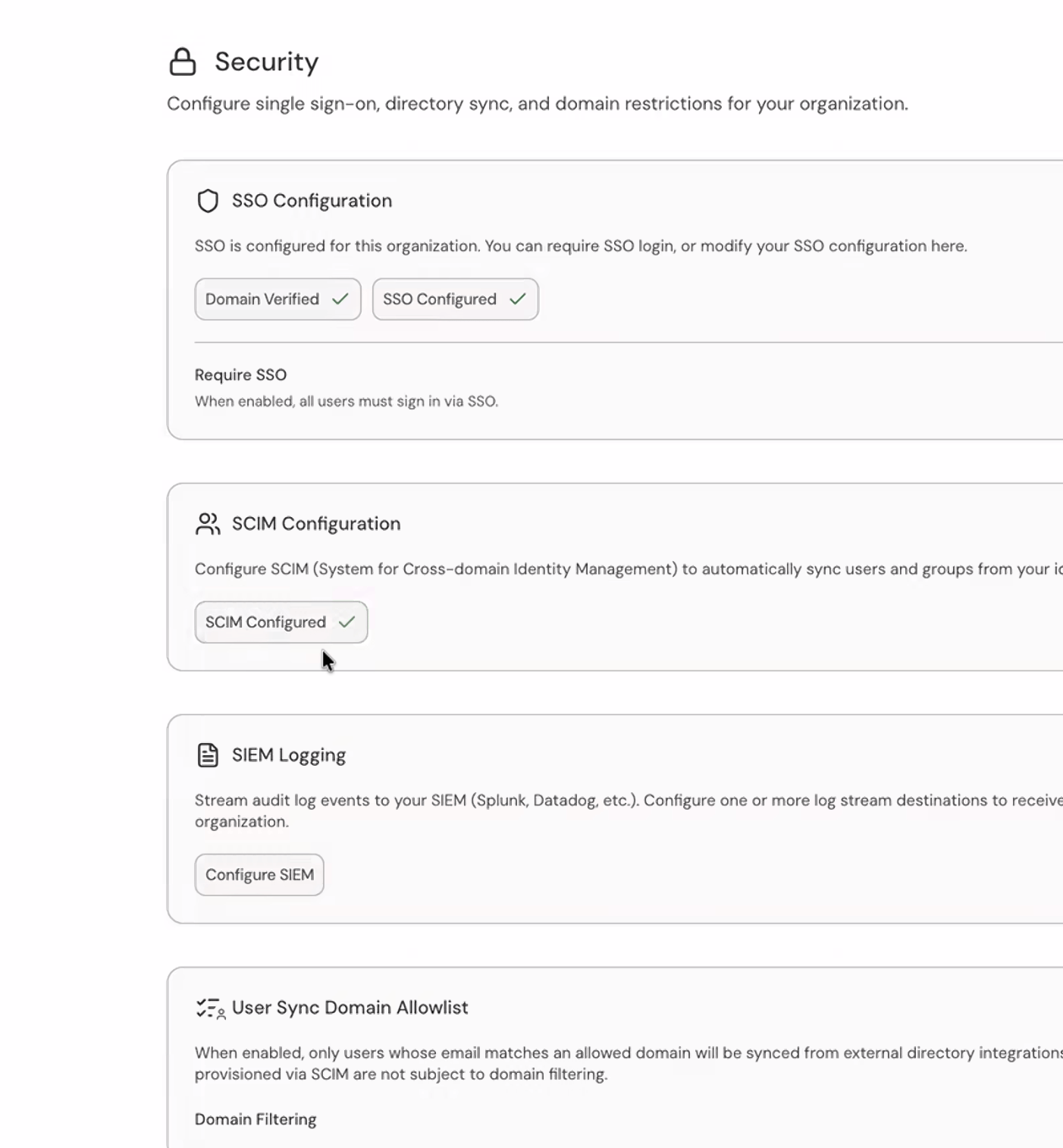
The SIEM Logging section in Organization Settings → Security
SIEM Logging uses the same WorkOS organization that Serval provisions when you set up SSO. Set up SSO first so that organization exists, or the Configure SIEM button can’t open the portal.
1
Open the Security settings
Go to Organization Settings → Security and find the SIEM Logging section. Only Org Admins can view or configure SIEM Logging.
2
Open the WorkOS portal
Select Configure SIEM. Serval opens a WorkOS-hosted portal in the same browser tab and returns you to the Security page when you finish.
3
Add one or more destinations
In the portal, add and configure each log stream destination that receives your audit events. You can connect more than one destination.
SIEM streaming metadata
Each streamed event carries the action, actor, targets, and request context, plus ametadata object with the event’s security dimensions. A key appears only when the event carries that dimension; the set of keys is additive-only — new keys may be added over time, but existing keys keep their name, meaning, and value format.
Metadata values longer than WorkOS’s 500-character limit are truncated (ending in
…). field_changes is the exception: it is never cut mid-string — whole trailing entries are dropped until the array fits, so the value always remains valid JSON. Any event whose metadata had to be cut down carries an extra truncated: "true" key — so your pipeline can distinguish a complete record from a shortened one.
Support tokens
Enable time-bound access for Serval support engineers to assist with your tenant:- Generate tokens — Users can create time-limited support tokens from the profile menu (Get support).
- Automatic expiration — Tokens expire after the configured duration with no manual cleanup required.
- Full audit trail — All access performed via support tokens is logged for compliance and transparency.
Quick reference
Steps that use Team Settings are documented in Team settings.