

What Catalyst can configure
- Set up an app for access requests: create the roles employees can request on an app or a specific resource inside it (a Slack channel, GitHub repo, AWS database, and more). If the app isn’t connected in Serval yet, Catalyst can create it too (native or custom), so access setup works end to end in one session.
- Access profiles: control which users or groups can request access to a role in the Help Desk.
- Access policies: configure approvals, max access length, and business justification for a role.
- Provisioning: how access is granted, whether by a linked identity-provider group, a manual task assigned to a person or group, or a custom workflow.
How it works
Describe what you want in a Catalyst session. Catalyst identifies the app, the resource, and the roles involved (creating the app in Serval if it isn’t connected yet), then drafts the roles, policies, and profiles as items in the side panel. Review the drafted items and click Publish to make them live. Nothing changes until you publish. For information on how staging and publishing work, see Changes and reviews.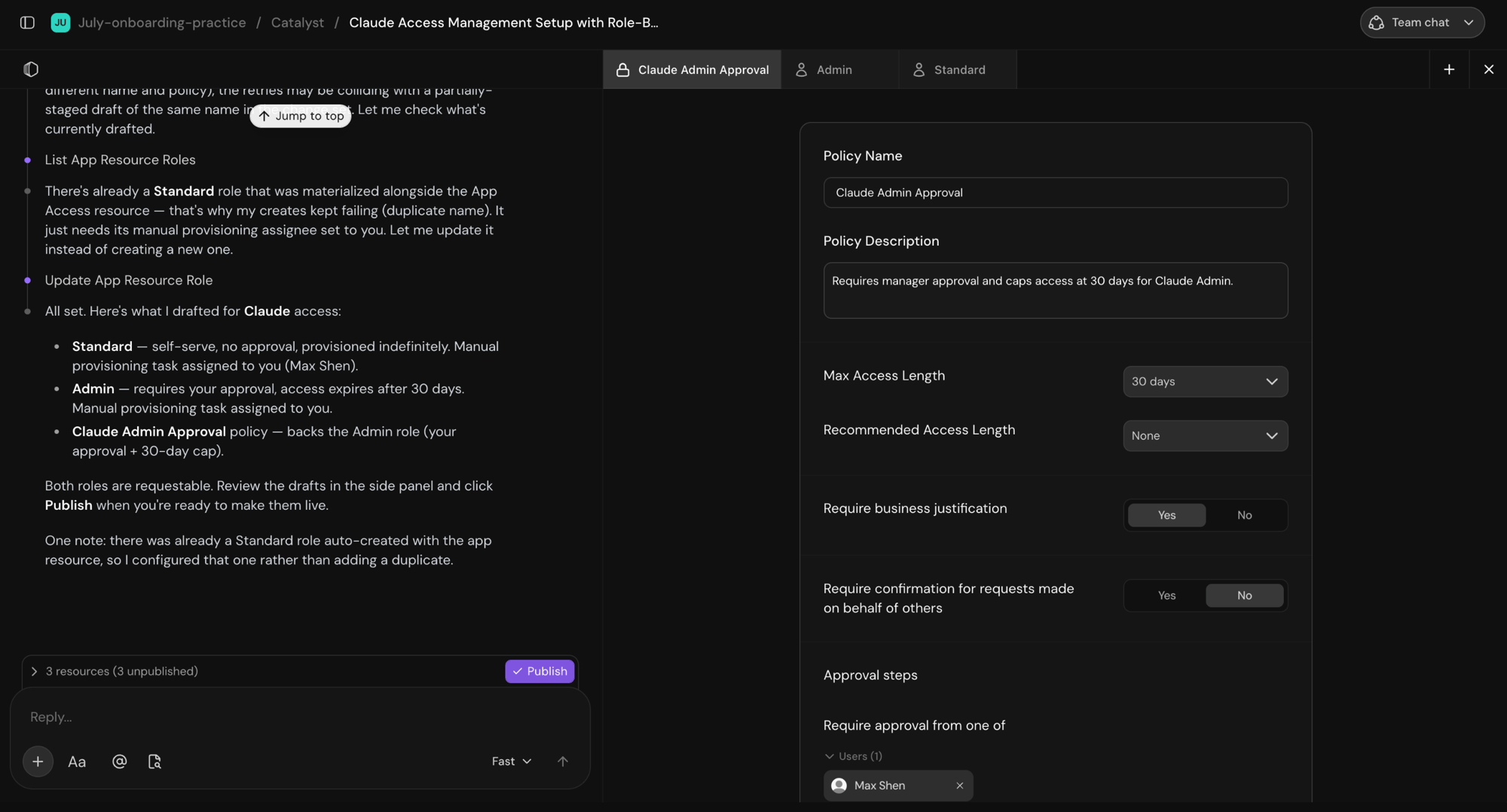
Catalyst drafts access roles and policies as resources in the side panel, ready to review and publish
Example tiered access flow
A single prompt can set up a full access flow, including creating the app in Serval if it isn’t connected yet. Consider the following example prompt:Set up access management for Figma. Employees should be able to request Editor or Admin. Editor is self-serve, no approval. Admin requests need my approval, and access should expire after 30 days. Provision both roles from our Okta groups:From that description, Catalyst drafts three items:figma-editorsfor Editor andfigma-adminsfor Admin.
- An Editor role: self-serve with no approval, provisioned through the
figma-editorsOkta group. - An Admin role: gated by an access policy, with access that expires after 30 days, provisioned through the
figma-adminsOkta group. - A Figma Admin Approval access policy: a 30-day access duration with you as the single approver.
Provisioning methods
When Catalyst sets up a role, it configures how access is actually granted. A role can’t grant access until it has a provisioning method:- Linked group: the grant maps to an IdP group (Okta, Microsoft Entra, Google Workspace). Prefer this when possible, since it makes each grant a single membership change you can audit, with no custom workflow to maintain.
- Manual: a person or group grants access by hand.
- Custom workflow: a workflow provisions and deprovisions access for systems that need bespoke API calls.
Usage tips
- Access profiles grant request eligibility, not automatic access. A profile controls which roles a group is allowed to request in the Help Desk. It doesn’t assign those roles to group members automatically.
- Changes are drafted, then published. Catalyst stages access changes for review. Click Publish to apply them. Nothing is live until you do.
Related
Access management
Roles, access policies, provisioning, and the full access lifecycle.
Changes and reviews
How Catalyst stages changes and how you review and publish them.
Building workflows
Build the workflows that access requests and provisioning rely on.