

What is Buildkite?
Buildkite is a CI/CD platform for running builds on your own infrastructure or Buildkite-hosted agents. Organizations use teams to control who can access pipelines, test suites, and related resources. Team members are assigned a member or maintainer role.What Serval can do once connected
Users must already be organization members in Buildkite before they can be added to a team. Serval does not invite new org members through this integration.
Configure Buildkite
Prerequisites
- A Buildkite organization you can administer
- Permission to create an API access token with team-management scopes
- Target users must already exist as members of the Buildkite organization
Create an API access token
- In Buildkite, open Personal Settings → API Access Tokens
- Click New API Access Token
- Configure the token:
- Description: e.g.
Serval Integration - Organization access: limit to the organization Serval should manage
- REST API scopes — under Organization & Users, enable the permissions below (see screenshot)
- Description: e.g.
- Create the token and copy the value — it is only shown once
Suggested permissions
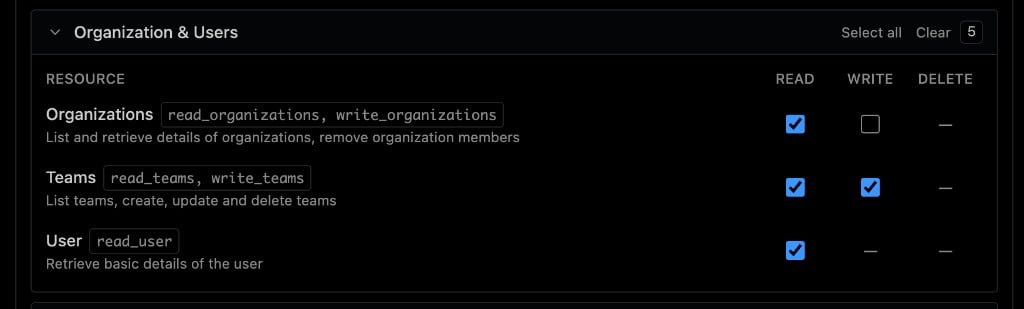
Minimum REST API scopes for team access management and healthchecks
Scope reference
Serval Configuration
- In Serval, go to Integrations → All integrations → Buildkite → Connect
-
Enter:
- Click Save
Access Management
After connecting:- Enable resource sync for Buildkite teams on the application settings page
- Serval ingests teams as requestable resources with Member and Maintainer entitlements
- Users can request access through your normal Serval access workflows; approved requests add or update the user’s team membership in Buildkite
Managing access later
- Rotate token — Create a new API access token in Buildkite, then update the token in Serval’s integration settings
- Disconnect — Remove the integration from Serval; revoke the token in Buildkite
Need help? Contact support@serval.com for assistance with your Buildkite integration.