

Understanding Provisioning Method Selection
The Four Provisioning Methods
Serval offers four ways to grant access: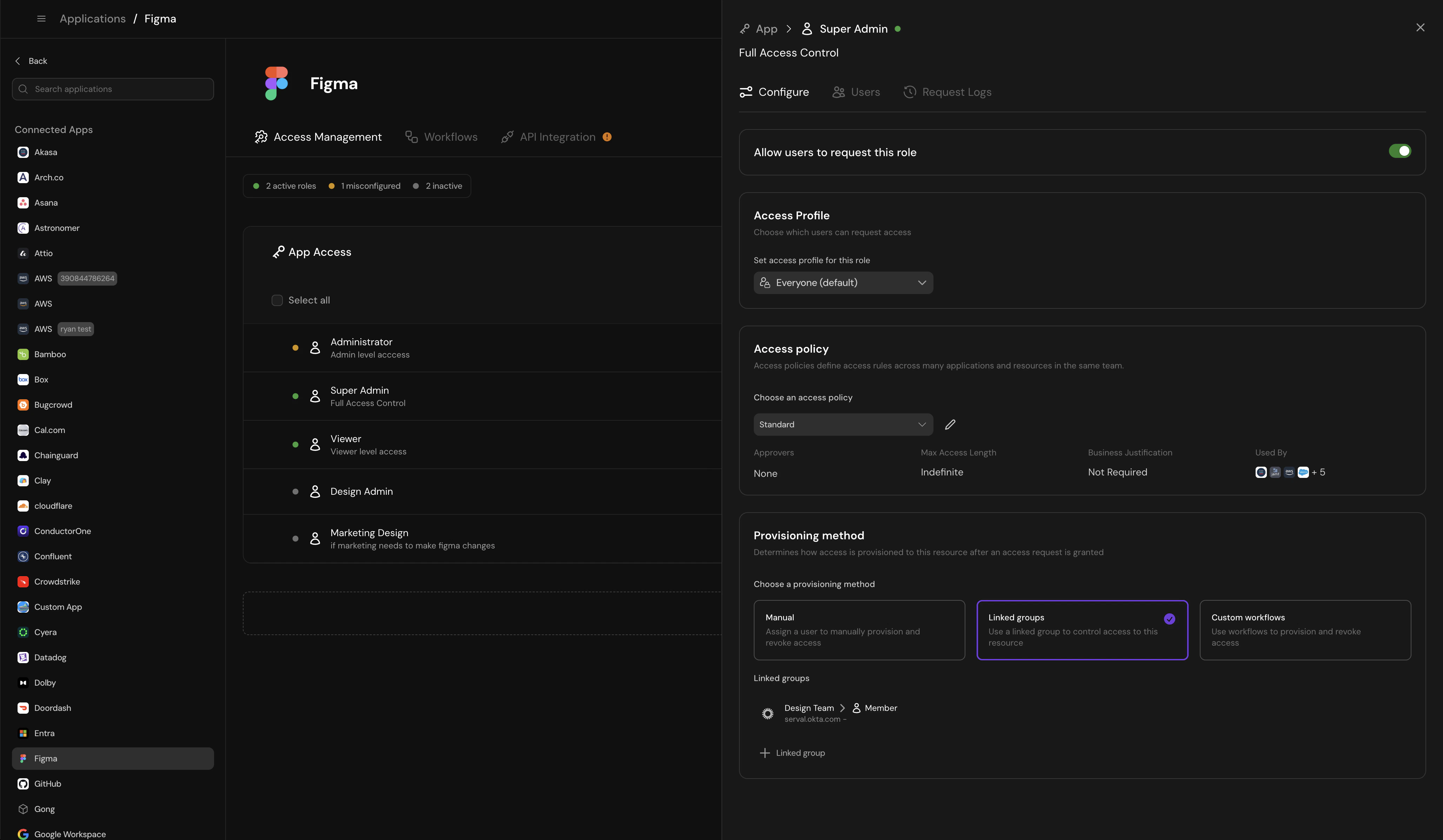
Configure access provisioning method for a role
Common Provisioning Scenarios
Asana access for entire company
Asana access for entire company
- Create “App-Asana-Users” group in Okta
- Configure Okta to provision Asana based on group membership
- In Serval, link the “Member” role to this Okta group
- When users request Asana access, Serval adds them to the group
- Okta syncs the change to Asana (typically within 15 minutes)
- When access expires, Serval removes them from the group
GitHub team access for engineering
GitHub team access for engineering
- Create “Engineering” as a custom resource in Serval
- Configure “Member” and “Maintainer” roles with direct provisioning
- Serval uses GitHub API to add/remove users from the team
- Access granted in seconds
- Create workflow that calls GitHub API to add user
- Send Slack notification to team lead
- On expiration, call API to remove user
AWS access requiring license purchase
AWS access requiring license purchase
- User requests AWS access
- Workflow creates Linear task: “Purchase AWS license”
- Workflow opens GitHub PR to Terraform config
- Workflow waits for Linear task completion
- Auto-merge PR when task marked done
- Apply Terraform to grant actual AWS access
Proprietary internal tool with no API
Proprietary internal tool with no API
- Configure manual provisioning with clear instructions
- Assign tasks to tool owner
- Owner manually adds user in the tool
- Owner marks task complete in Serval
- For temporary access, Serval creates removal task when access expires
Different Provisioning Strategies in a Single Application
You can use different provisioning methods for different roles in the same application. Example: GitHub- App-level “Member” access → Linked Groups (via Okta)
- Team-specific “Maintainer” access → Direct provisioning (via GitHub API)
- Organization “Owner” access → Manual provisioning (too sensitive to automate)
Linked Groups
Access granted by adding the user to a group in your Identity Provider (Okta, Google, Rippling, Entra). When access expires, the user is automatically removed.How It Works
Request approved
Serval adds to group
IdP provisions access
Automatic removal
Who Holds a Linked Role
A role’s linked groups also tell Serval who holds it: anyone who is a member of every linked group appears on the role’s roster, whether Serval added them or they were already in the group when it synced. Removing the user from the group removes them from the role. When an access-review revocation or unused-license reclamation removes a role someone holds through linked groups, Serval removes them from those groups, whatever the role’s provisioning method. The review’s grant details show that the seat is held via linked groups and which groups confirm it. Linked groups can be configured on a role that uses any provisioning method. Turn off Members of every linked group hold this role on the role’s Configure tab to make the links provisioning-only, so that only users granted the role through Serval count as members. Use this for bundle roles like an on-call role that provisions several admin roles at once.When to Use Linked Groups
✓ Use when
- Your IdP already provisions access via groups
- You want automatic cleanup when access expires
- You need audit trails in your IdP
- You’re managing access to multiple apps with one group
✗ Don't use when
- The application doesn’t integrate with your IdP
- You need more complex provisioning logic
- Group membership would grant too much access
Custom Workflow
Access granted through a custom process—like using an API to send an email invite or opening a GitHub PR for a Terraform change.How It Works
You define a workflow that Serval executes when access is granted. Workflows can include multiple steps, conditional logic, and integrations with various tools. Read more about how to set up custom access workflows here.Examples
Simple: GitHub team management
Simple: GitHub team management
- Use GitHub API to add user to team
- Send Slack notification to user and team lead
- On expiration, remove user from team
Multi-step: Infrastructure access
Multi-step: Infrastructure access
- Create Linear task: “Purchase AWS license for [user]”
- Open GitHub PR to add user to Terraform AWS group
- Wait for Linear task completion
- Auto-merge GitHub PR
- Apply Terraform to grant actual AWS access
Complex: Onboarding workflow
Complex: Onboarding workflow
- Create accounts in internal apps
- Send welcome email with credentials
- Add to Slack channels
- Create onboarding tasks in project management tool
- Schedule follow-up check-in with manager
When to Use Custom Workflows
✓ Use when
- You need multi-step provisioning processes
- Access requires API calls to multiple systems
- You want to coordinate with other tools (Linear, GitHub, etc.)
- Your provisioning logic has conditional branches
✗ Don't use when
- A simpler method (Linked Groups or Direct) would work
- You’re not comfortable building workflows
- The process is entirely manual anyway
Direct Provisioning
Pre-built API provisioning for common applications. Serval uses the application’s API to grant access directly.How It Works
Request approved
Serval calls API
Access granted immediately
Automatic removal
Supported Applications
Direct provisioning is available for select applications with robust APIs.When to Use Direct Provisioning
✓ Use when
- The application supports direct provisioning in Serval
- You want fully automated provisioning without IdP groups
- The application isn’t connected to your IdP
- You need immediate access grants
✗ Don't use when
- The application doesn’t support direct provisioning yet
- You prefer provisioning through IdP groups for consistency
Manual Provisioning
Access granted through a task assigned to the application owner (via ticket or Slack). A human manually grants the access. When you select a group configured as an assignment group for the task’s team, that group owns the provisioning and removal tasks. The team’s Group member assignment setting controls individual assignment: Human triage leaves the task with the group until someone claims it; Round-robin also assigns a group member. If you select multiple groups, the first group is the assignment target. To use group ownership, add the group through the team’s assignment rules, default assignment, or Ticket sidebar groups before selecting it for manual provisioning. Other org groups continue to select an individual member.How It Works
Request approved
Task created
Owner grants access
Task marked complete
Removal task (for temporary access)
When to Use Manual Provisioning
✓ Use when
- The application has no API or IdP integration
- Provisioning requires human judgment
- The process is very infrequent
- You’re still building automation
✗ Don't use when
- You have high-volume access requests
- Faster automated methods are available
- Manual intervention creates bottlenecks
Choosing the Right Method
Use this decision tree to select the best provisioning method:Is this app connected to your IdP with SCIM or group-based provisioning?
- Most auditable approach
- Works across multiple apps consistently
- Best for apps your entire company uses
Does Serval support direct provisioning for this app?
- Fully automated
- Access granted in seconds
- No IdP dependency
Do you need multi-step logic, external tool integration, or conditional provisioning?
- Most flexible option
- Can coordinate across multiple systems
- Handles complex approval chains
- Requires workflow building skills
Default to Manual Provisioning
- No automation options are available yet
- Access requests are infrequent (< 5 per month)
- You’re building automation but aren’t ready yet
Start Simple, Then Automate
Don’t feel pressure to automate everything immediately. A pragmatic approach:- Week 1: Set up manual provisioning for all apps to establish the request → approval flow
- Week 2: Convert high-volume apps to Linked Groups or Direct provisioning
- Month 2: Build custom workflows for complex provisioning scenarios
- Ongoing: Automate manual processes as volume increases
Best Practices
Name IdP groups consistently
App-[ApplicationName]-[RoleName]Examples: App-GitHub-Members, App-Asana-Admins, App-Figma-EditorsThis makes it obvious which groups are managed by access requests and easier to audit.