> ## Documentation Index
> Fetch the complete documentation index at: https://docs.serval.com/llms.txt
> Use this file to discover all available pages before exploring further.
# Integrations Overview
> Connect your tech stack to Serval - browse the catalog, connect with the auth flow each app uses, verify with health checks, and manage everything from the Integrations page.
## Connect your entire tech stack
Integrations are how Serval acts on the rest of your stack. A connected application can power ticket sync with your ITSM, mirror knowledge bases into Serval, sync users/groups/devices for access management and assets, and give workflows (and Catalyst) the ability to take real actions - provision access, manage devices, file tickets, query records.
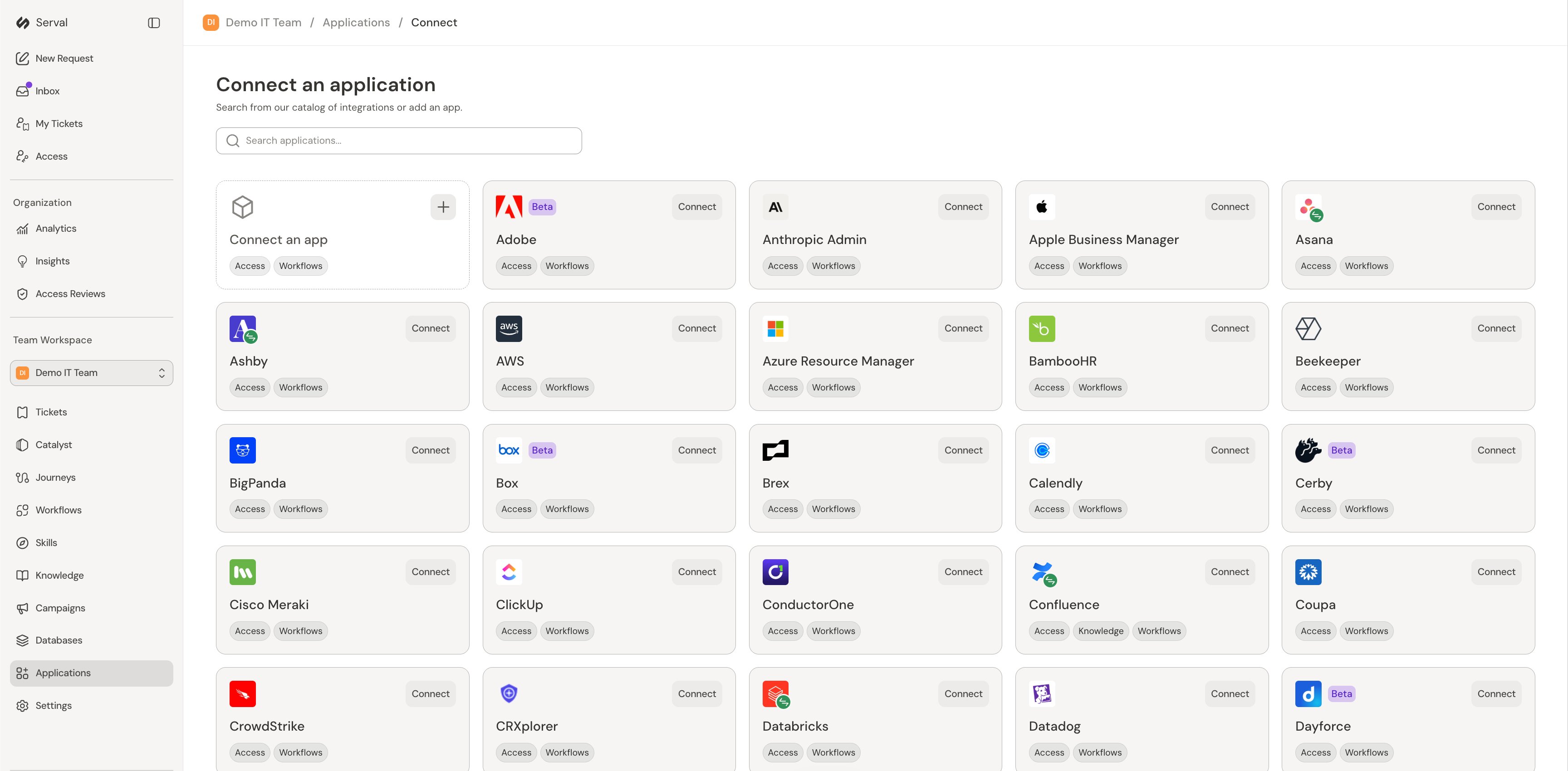
To browse what's available, open your team workspace and go to **Integrations → Connect new**. Search the catalog, or choose **Connect an app** to add a custom application.
 ## How connecting works
Each integration uses the connection flow its provider supports. You'll see one of three patterns:
* **Sign in with the provider (OAuth)** - a browser sign-in and consent screen, with no credentials to copy. Examples: [Confluence](/sections/integrations/confluence), [Jira](/sections/integrations/jira), [Notion](/sections/integrations/notion), [Microsoft 365](/sections/integrations/microsoft-graph).
* **Guided app installs** - Serval walks you through installing an app on the provider side, like a [Slack](/sections/integrations/slack) app from a generated manifest, the Serval [GitHub](/sections/integrations/github) App, or the [Microsoft Teams](/sections/integrations/microsoft-teams) bot package.
* **Credential forms** - you create a credential in the provider's admin console and paste it into Serval: API tokens ([Kandji](/sections/integrations/kandji), [Freshservice](/sections/integrations/freshservice), [Zendesk](/sections/integrations/zendesk)), OAuth client credentials ([Okta](/sections/integrations/okta), [Salesforce](/sections/integrations/salesforce), [ServiceNow](/sections/integrations/servicenow)), or service accounts ([Google Workspace](/sections/integrations/google-workspace), which also offers a basic Sign in with Google flow).
Every integration's guide documents the exact provider-side click-path to create the credential, the fields Serval's connect form asks for, and the gotchas we see most often during setup. Secrets are stored encrypted and shown masked when you edit a connection later.
## Manage connected applications
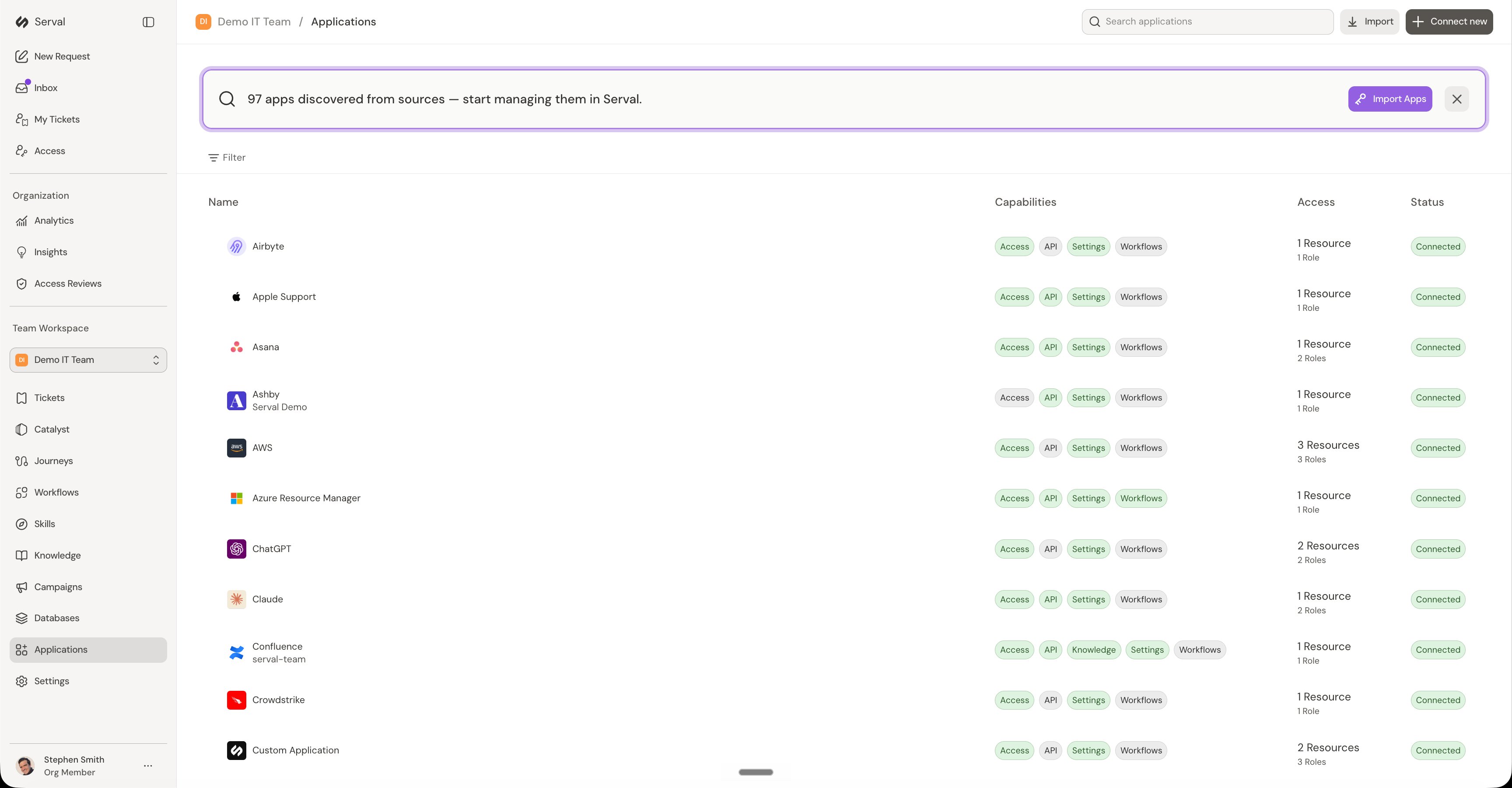
The **Integrations** page lists everything your team has connected, the capabilities each connection powers - Access, API, Knowledge, Ticket Sync, Workflows - and its connection status. Serval can also discover apps in use from your connected sources, so you can bring unmanaged software under management from the same page.
## How connecting works
Each integration uses the connection flow its provider supports. You'll see one of three patterns:
* **Sign in with the provider (OAuth)** - a browser sign-in and consent screen, with no credentials to copy. Examples: [Confluence](/sections/integrations/confluence), [Jira](/sections/integrations/jira), [Notion](/sections/integrations/notion), [Microsoft 365](/sections/integrations/microsoft-graph).
* **Guided app installs** - Serval walks you through installing an app on the provider side, like a [Slack](/sections/integrations/slack) app from a generated manifest, the Serval [GitHub](/sections/integrations/github) App, or the [Microsoft Teams](/sections/integrations/microsoft-teams) bot package.
* **Credential forms** - you create a credential in the provider's admin console and paste it into Serval: API tokens ([Kandji](/sections/integrations/kandji), [Freshservice](/sections/integrations/freshservice), [Zendesk](/sections/integrations/zendesk)), OAuth client credentials ([Okta](/sections/integrations/okta), [Salesforce](/sections/integrations/salesforce), [ServiceNow](/sections/integrations/servicenow)), or service accounts ([Google Workspace](/sections/integrations/google-workspace), which also offers a basic Sign in with Google flow).
Every integration's guide documents the exact provider-side click-path to create the credential, the fields Serval's connect form asks for, and the gotchas we see most often during setup. Secrets are stored encrypted and shown masked when you edit a connection later.
## Manage connected applications
The **Integrations** page lists everything your team has connected, the capabilities each connection powers - Access, API, Knowledge, Ticket Sync, Workflows - and its connection status. Serval can also discover apps in use from your connected sources, so you can bring unmanaged software under management from the same page.
 ## Verify with health checks
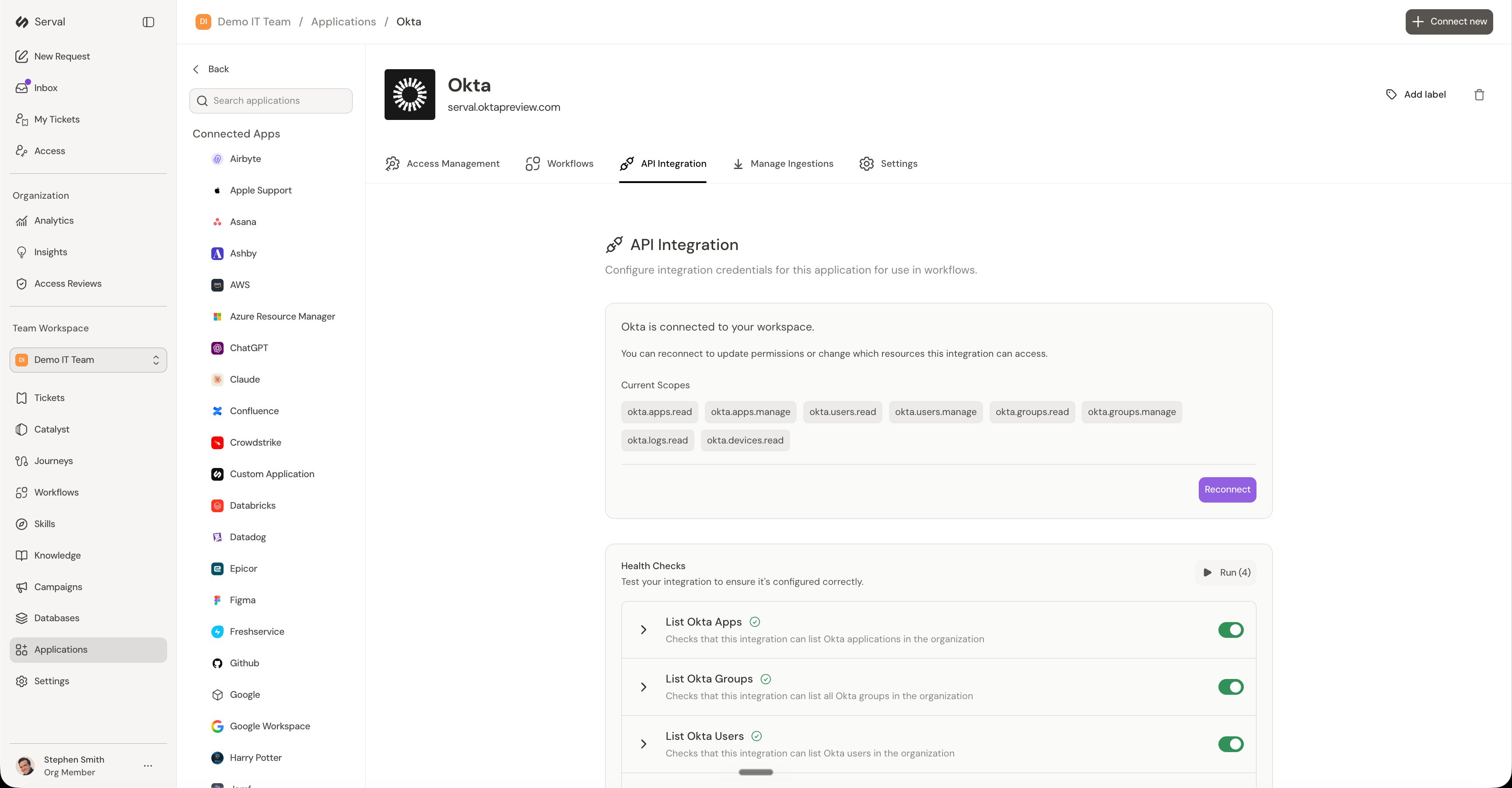
Most API-connected catalog integrations have an **API Integration** tab showing the scopes or permissions the connection was granted and a set of **health checks** that exercise the live integration - authentication, list/read access per surface, and write access where workflows need it. Run them right after connecting, and any time something stops working: a failing check names what it couldn't reach, which usually points straight at a missing scope or permission on the provider side. A few integrations don't include built-in health checks yet - their pages say so and suggest a quick manual verification instead.
## Verify with health checks
Most API-connected catalog integrations have an **API Integration** tab showing the scopes or permissions the connection was granted and a set of **health checks** that exercise the live integration - authentication, list/read access per surface, and write access where workflows need it. Run them right after connecting, and any time something stops working: a failing check names what it couldn't reach, which usually points straight at a missing scope or permission on the provider side. A few integrations don't include built-in health checks yet - their pages say so and suggest a quick manual verification instead.
 ## Duplicate applications across teams
You can copy a connected application's configuration to other teams in one click. Instead of configuring each team from scratch, open the application's **Settings** tab, find the **Duplicate Application** section, click **Duplicate**, and choose the destination team.
## Integration sync history
Each application's **Settings** tab includes a **Sync History** view for monitoring background syncs:
* **Track recent sync runs** - when each sync ran and its outcome
* **View breakdowns** - how many items were added, updated, or removed
* **Identify issues** - spot failed syncs and review error details to troubleshoot connectivity or permission problems
## Find your integration
Each guide in this section covers one integration end to end: what it enables, where to get credentials on the provider side, the connect form in Serval, how to verify the connection, and the gotchas that actually come up. The most commonly connected:
**Identity & directory:** [Okta](/sections/integrations/okta) · [Google Workspace](/sections/integrations/google-workspace) · [Microsoft 365 / Entra ID](/sections/integrations/microsoft-graph) · [LDAP / Active Directory](/sections/integrations/ldap-ad)
**Messaging & collaboration:** [Slack](/sections/integrations/slack) · [Microsoft Teams](/sections/integrations/microsoft-teams) · [Confluence](/sections/integrations/confluence) · [Notion](/sections/integrations/notion)
**ITSM & ticketing:** [ServiceNow](/sections/integrations/servicenow) · [Jira](/sections/integrations/jira) · [Zendesk](/sections/integrations/zendesk) · [Freshservice](/sections/integrations/freshservice)
**Devices & assets:** [Kandji](/sections/integrations/kandji) · [Jamf](/sections/integrations/jamf) · [Apple Business Manager](/sections/integrations/apple-business-manager)
**HR & business systems:** [Workday](/sections/integrations/workday) · [Salesforce](/sections/integrations/salesforce) · [NetSuite](/sections/integrations/netsuite) · [GitHub](/sections/integrations/github)
Don't see your app? You can [connect a custom application](/sections/integrations/application) through Serval's API integration framework.
## Duplicate applications across teams
You can copy a connected application's configuration to other teams in one click. Instead of configuring each team from scratch, open the application's **Settings** tab, find the **Duplicate Application** section, click **Duplicate**, and choose the destination team.
## Integration sync history
Each application's **Settings** tab includes a **Sync History** view for monitoring background syncs:
* **Track recent sync runs** - when each sync ran and its outcome
* **View breakdowns** - how many items were added, updated, or removed
* **Identify issues** - spot failed syncs and review error details to troubleshoot connectivity or permission problems
## Find your integration
Each guide in this section covers one integration end to end: what it enables, where to get credentials on the provider side, the connect form in Serval, how to verify the connection, and the gotchas that actually come up. The most commonly connected:
**Identity & directory:** [Okta](/sections/integrations/okta) · [Google Workspace](/sections/integrations/google-workspace) · [Microsoft 365 / Entra ID](/sections/integrations/microsoft-graph) · [LDAP / Active Directory](/sections/integrations/ldap-ad)
**Messaging & collaboration:** [Slack](/sections/integrations/slack) · [Microsoft Teams](/sections/integrations/microsoft-teams) · [Confluence](/sections/integrations/confluence) · [Notion](/sections/integrations/notion)
**ITSM & ticketing:** [ServiceNow](/sections/integrations/servicenow) · [Jira](/sections/integrations/jira) · [Zendesk](/sections/integrations/zendesk) · [Freshservice](/sections/integrations/freshservice)
**Devices & assets:** [Kandji](/sections/integrations/kandji) · [Jamf](/sections/integrations/jamf) · [Apple Business Manager](/sections/integrations/apple-business-manager)
**HR & business systems:** [Workday](/sections/integrations/workday) · [Salesforce](/sections/integrations/salesforce) · [NetSuite](/sections/integrations/netsuite) · [GitHub](/sections/integrations/github)
Don't see your app? You can [connect a custom application](/sections/integrations/application) through Serval's API integration framework.