> ## Documentation Index
> Fetch the complete documentation index at: https://docs.serval.com/llms.txt
> Use this file to discover all available pages before exploring further.
# Buildkite
Serval's Buildkite integration lets you automate CI/CD operations and manage **team membership** in your Buildkite organization.
The integration connects via a Buildkite API access token scoped to your organization.
***
## What is Buildkite?
[Buildkite](https://buildkite.com) is a CI/CD platform for running builds on your own infrastructure or Buildkite-hosted agents. Organizations use **teams** to control who can access pipelines, test suites, and related resources. Team members are assigned a **member** or **maintainer** role.
***
## What Serval can do once connected
| Capability | Description |
| -------------------- | ----------------------------------------------------------------------------------------------------------------------------------------------------------------- |
| Access Management | Request and provision **Member** or **Maintainer** access to Buildkite teams; sync team membership into Serval |
| Automation workflows | List teams, manage team members, and call any endpoint in the [Buildkite REST API v2](https://buildkite.com/docs/apis/rest-api) subset exposed by the integration |
Users must already be **organization members** in Buildkite before they can be added to a team. Serval does not invite new org members through this integration.
***
## Configure Buildkite
### Prerequisites
* A Buildkite organization you can administer
* Permission to create an API access token with team-management scopes
* Target users must already exist as members of the Buildkite organization
### Create an API access token
1. In Buildkite, open **Personal Settings → API Access Tokens**
2. Click **New API Access Token**
3. Configure the token:
* **Description**: e.g. `Serval Integration`
* **Organization access**: limit to the organization Serval should manage
* **REST API scopes** — under **Organization & Users**, enable the permissions below (see screenshot)
4. Create the token and copy the value — it is only shown once
For details, see [Managing API access tokens](https://buildkite.com/docs/apis/managing-api-tokens).
### Suggested permissions
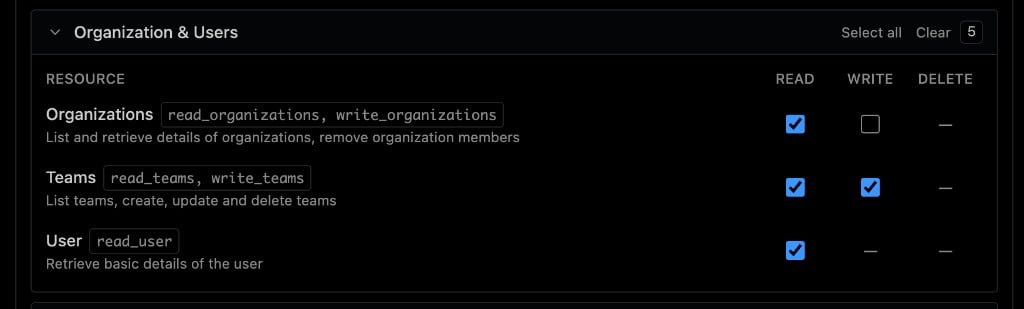 | Resource | Read | Write |
| ------------------------------------ | ---- | ----- |
| Organizations (`read_organizations`) | ✅ | — |
| Teams (`read_teams`, `write_teams`) | ✅ | ✅ |
| User (`read_user`) | ✅ | — |
### Scope reference
| Scope | Used for |
| -------------------- | -------------------------------------------------------------- |
| `read_teams` | List teams, read team membership, healthchecks |
| `write_teams` | Add users to teams, change roles, remove team members |
| `read_organizations` | Look up organization members by email when provisioning access |
| `read_user` | Validate the API token during connection healthchecks |
***
## Serval Configuration
1. In Serval, go to **Apps → Available → Buildkite → Connect**
2. Enter:
| Field | Description |
| ----------------- | ------------------------------------------------------------------------------------------- |
| Organization Slug | Your Buildkite org slug (from the org URL, e.g. `my-company` in `buildkite.com/my-company`) |
| API Access Token | The token you created above |
3. Click **Save**
Serval validates the connection and runs healthchecks for authentication, team listing, and organization member listing. Once verified, the integration shows **Healthy** on the Integrations page.
### Access Management
After connecting:
1. Enable **resource sync** for Buildkite teams on the application settings page
2. Serval ingests teams as requestable resources with **Member** and **Maintainer** entitlements
3. Users can request access through your normal Serval access workflows; approved requests add or update the user's team membership in Buildkite
### Managing access later
* **Rotate token** — Create a new API access token in Buildkite, then update the token in Serval's integration settings
* **Disconnect** — Remove the integration from Serval; revoke the token in Buildkite
***
Need help? Contact **[support@serval.com](mailto:support@serval.com)** for assistance with your Buildkite integration.
| Resource | Read | Write |
| ------------------------------------ | ---- | ----- |
| Organizations (`read_organizations`) | ✅ | — |
| Teams (`read_teams`, `write_teams`) | ✅ | ✅ |
| User (`read_user`) | ✅ | — |
### Scope reference
| Scope | Used for |
| -------------------- | -------------------------------------------------------------- |
| `read_teams` | List teams, read team membership, healthchecks |
| `write_teams` | Add users to teams, change roles, remove team members |
| `read_organizations` | Look up organization members by email when provisioning access |
| `read_user` | Validate the API token during connection healthchecks |
***
## Serval Configuration
1. In Serval, go to **Apps → Available → Buildkite → Connect**
2. Enter:
| Field | Description |
| ----------------- | ------------------------------------------------------------------------------------------- |
| Organization Slug | Your Buildkite org slug (from the org URL, e.g. `my-company` in `buildkite.com/my-company`) |
| API Access Token | The token you created above |
3. Click **Save**
Serval validates the connection and runs healthchecks for authentication, team listing, and organization member listing. Once verified, the integration shows **Healthy** on the Integrations page.
### Access Management
After connecting:
1. Enable **resource sync** for Buildkite teams on the application settings page
2. Serval ingests teams as requestable resources with **Member** and **Maintainer** entitlements
3. Users can request access through your normal Serval access workflows; approved requests add or update the user's team membership in Buildkite
### Managing access later
* **Rotate token** — Create a new API access token in Buildkite, then update the token in Serval's integration settings
* **Disconnect** — Remove the integration from Serval; revoke the token in Buildkite
***
Need help? Contact **[support@serval.com](mailto:support@serval.com)** for assistance with your Buildkite integration.