> ## Documentation Index
> Fetch the complete documentation index at: https://docs.serval.com/llms.txt
> Use this file to discover all available pages before exploring further.
# Approvals
Serval workflows can be configured to require approvals before execution. This provides an additional layer of control and security for sensitive operations in your organization.
## Overview
Workflow approvals in Serval offer flexible options to match your organization's approval processes:
* **Individual Approvers**: Specify one or more users who can approve the workflow.
* **Group-based Approvals**: Leverage groups created in Serval or synced from external systems. Multiple groups can be added to a single approval step.
* **Manager Approvals**: Automatically route approvals to the requester's manager.
* **Multi-step Approvals**: Create approval chains where multiple parties must approve in sequence.
* **Self-Approval**: Toggling self-approval enables users, who are also approvers for the workflow, to approve their own requests.
* **Custom approval:** Automate approval decisions based on your business rules. Approve/deny instantly based on custom logic, or escalate.
 ## Configuring Workflow Approvers
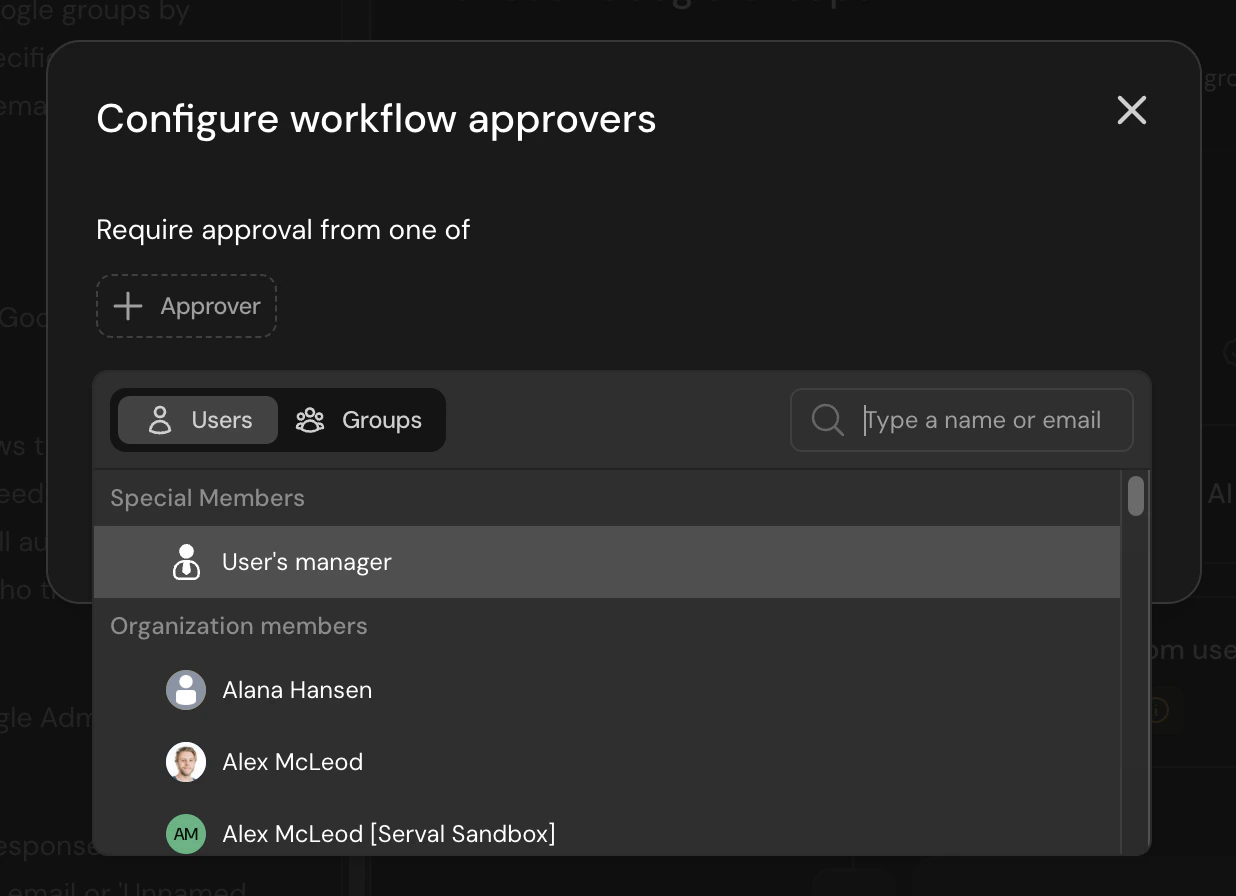
To configure approvers for a workflow, click **Add Approvers** above the workflow blocks. This will open the workflow approvers configuration dialog.
## Configuring Workflow Approvers
To configure approvers for a workflow, click **Add Approvers** above the workflow blocks. This will open the workflow approvers configuration dialog.
 ### Adding Approvers
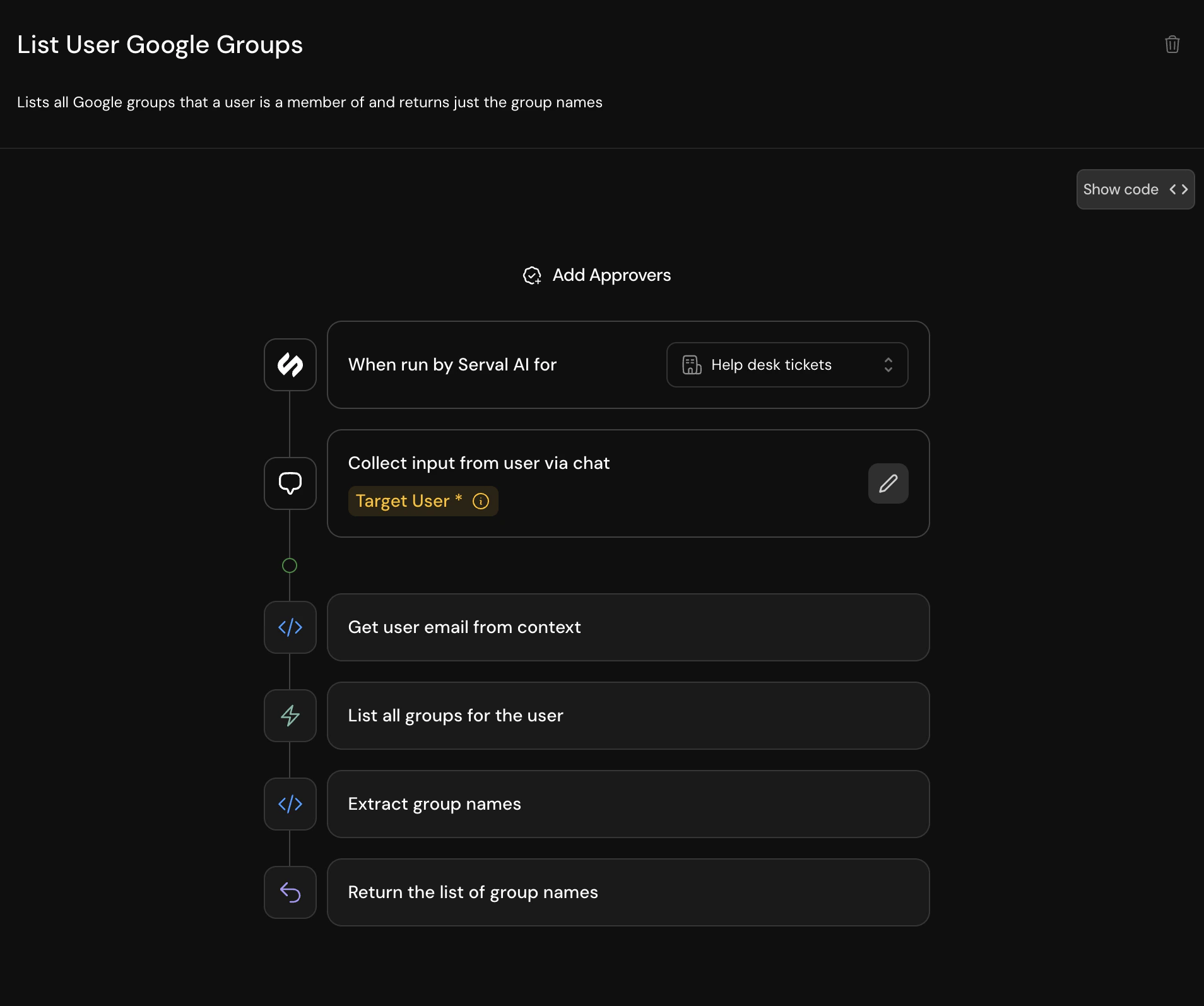
In the configuration dialog, you can:
1. **Select Users or Groups**: Use the toggle to switch between individual users and groups
2. **Search for Approvers**: Type a name or email to find specific users or groups
3. **Add Special Members**: Select "User's manager" to automatically route to the requester's manager
4. **Configure Self-Approval**: Toggle whether approvers can approve their own requests
### Multi-step approval process
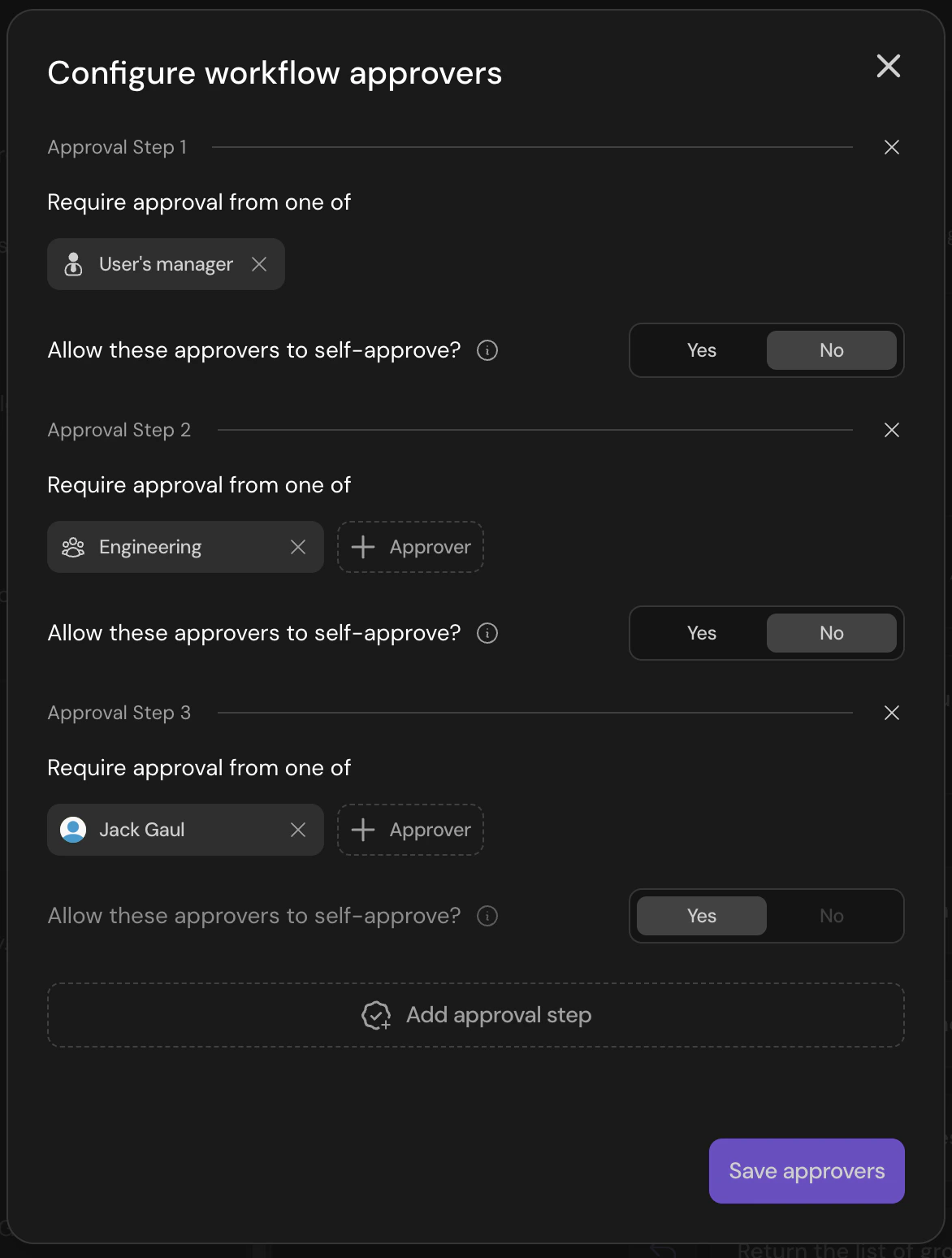
For workflows requiring multiple levels of approval, you can add additional approval steps by clicking "Add approval step". This allows you to create approval chains such as:
1. First, the requester's manager must approve
2. Then, a member of the Engineering team must provide approval
3. Finally, a specific member of the IT team must provide final approval
### Adding Approvers
In the configuration dialog, you can:
1. **Select Users or Groups**: Use the toggle to switch between individual users and groups
2. **Search for Approvers**: Type a name or email to find specific users or groups
3. **Add Special Members**: Select "User's manager" to automatically route to the requester's manager
4. **Configure Self-Approval**: Toggle whether approvers can approve their own requests
### Multi-step approval process
For workflows requiring multiple levels of approval, you can add additional approval steps by clicking "Add approval step". This allows you to create approval chains such as:
1. First, the requester's manager must approve
2. Then, a member of the Engineering team must provide approval
3. Finally, a specific member of the IT team must provide final approval
 ## Mid-run approvals
A workflow can pause partway through to collect an approval, rather than only gating before it starts. When the workflow reaches that step, it holds until a designated approver responds, then resumes automatically. If an approver denies the request, the workflow stops.
* **Approve at the right moment**: Run initial steps first, then request approval only when the workflow reaches a decision point.
* **Respond anywhere**: Approvers respond in Slack, Teams, email, or the Serval web portal, and the request appears in their inbox.
* **Choose who approves**: Route to a specific user, a group, or the target user's manager, and chain multiple approval steps together.
Use in situations where one workflow needs a human decision at a specific point without splitting the logic across separate workflows. Common examples include mid-run approvals for budget sign-offs, access escalations, and security reviews.
## Delegation
Approvers can delegate their approval authority to another user or group, so requests keep moving when an approver is out. Delegation covers workflow approvals, access-request approvals, and ticket assignments.
* **Set rules in user settings**: Configure delegation from a user's settings, not a workflow's approver dialog. Each rule names the delegator and one or more delegates.
* **Delegate to a user or a group**: Route delegated approvals to a specific person or to any member of a group.
* **Route automatically**: When an approval would go to the delegator, Serval sends it to the delegate instead, with no manual reassignment.
* **Also applies to ticket assignments**: When a ticket would be assigned to the delegator, Serval routes it to their delegate instead.
* **New approvals and assignments only**: Only new approvals and assignments are delegated. Anything already assigned to the delegator stays with them.
* **Keep a clear audit trail**: The approval timeline shows who delegated and who made the final decision.
* **Manage through the API**: Create and manage delegation rules with the Serval public API.
## Best practices
* **Use groups for scalability**: Instead of adding individual users, consider using groups to make approval management easier as your team grows
* **Leverage manager approvals**: For requests that need hierarchical approval, use the "User's manager" option
* **Consider self-approval settings**: Carefully evaluate whether approvers should be able to approve their own requests based on your security requirements
* **Document approval chains**: For complex multi-step approvals, document the approval flow for your team's reference
* **Sole Approver**: In the case of a specified user to be the sole approver, it is recommended that you turn on self-approval. Otherwise, the workflow will be unable completed whenever the requester is also the sole approver.
## Mid-run approvals
A workflow can pause partway through to collect an approval, rather than only gating before it starts. When the workflow reaches that step, it holds until a designated approver responds, then resumes automatically. If an approver denies the request, the workflow stops.
* **Approve at the right moment**: Run initial steps first, then request approval only when the workflow reaches a decision point.
* **Respond anywhere**: Approvers respond in Slack, Teams, email, or the Serval web portal, and the request appears in their inbox.
* **Choose who approves**: Route to a specific user, a group, or the target user's manager, and chain multiple approval steps together.
Use in situations where one workflow needs a human decision at a specific point without splitting the logic across separate workflows. Common examples include mid-run approvals for budget sign-offs, access escalations, and security reviews.
## Delegation
Approvers can delegate their approval authority to another user or group, so requests keep moving when an approver is out. Delegation covers workflow approvals, access-request approvals, and ticket assignments.
* **Set rules in user settings**: Configure delegation from a user's settings, not a workflow's approver dialog. Each rule names the delegator and one or more delegates.
* **Delegate to a user or a group**: Route delegated approvals to a specific person or to any member of a group.
* **Route automatically**: When an approval would go to the delegator, Serval sends it to the delegate instead, with no manual reassignment.
* **Also applies to ticket assignments**: When a ticket would be assigned to the delegator, Serval routes it to their delegate instead.
* **New approvals and assignments only**: Only new approvals and assignments are delegated. Anything already assigned to the delegator stays with them.
* **Keep a clear audit trail**: The approval timeline shows who delegated and who made the final decision.
* **Manage through the API**: Create and manage delegation rules with the Serval public API.
## Best practices
* **Use groups for scalability**: Instead of adding individual users, consider using groups to make approval management easier as your team grows
* **Leverage manager approvals**: For requests that need hierarchical approval, use the "User's manager" option
* **Consider self-approval settings**: Carefully evaluate whether approvers should be able to approve their own requests based on your security requirements
* **Document approval chains**: For complex multi-step approvals, document the approval flow for your team's reference
* **Sole Approver**: In the case of a specified user to be the sole approver, it is recommended that you turn on self-approval. Otherwise, the workflow will be unable completed whenever the requester is also the sole approver.