> ## Documentation Index
> Fetch the complete documentation index at: https://docs.serval.com/llms.txt
> Use this file to discover all available pages before exploring further.
# Ticket Flows
> Track a resolution as it moves across ticket types — creating a new incident, problem, or change from an existing ticket, with AI-assisted field prefill and automatic linking
Resolving an issue often spans more than one ticket. An incident can reveal an underlying problem, a problem can call for a change to fix it permanently, and a request can turn out to be an incident. Serval models these connections directly: you can **derive** a new ticket of a different type from an existing one. Deriving doesn't convert the original ticket — it creates a separate new ticket, pre-fills it from the source, and links the two together so the related work stays connected.
 ***
## How Tickets Flow Across Types
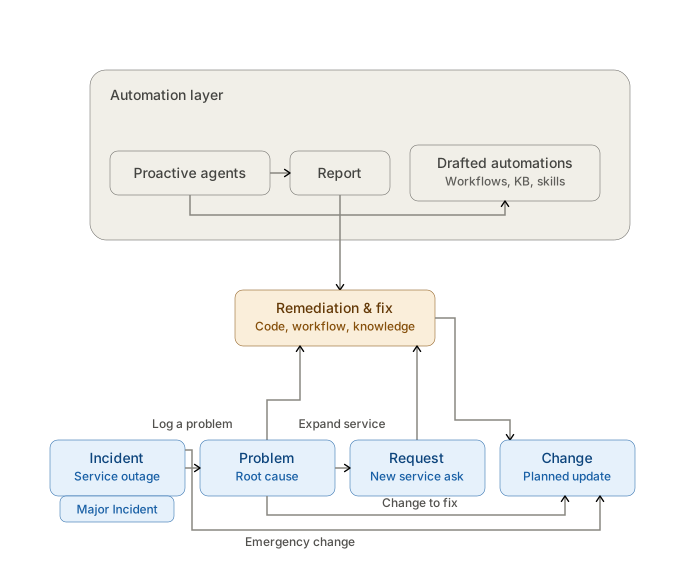
Each ticket type has a distinct job, and work on one ticket often leads to opening a related ticket of a different type:
* An **Incident or Major Incident** can uncover an underlying **Problem** when service is being restored but the root cause still needs to be found.
* A **Problem** can lead to a **Change** when the permanent fix requires a controlled modification, or to a **Request** when it surfaces a new service need.
* An **Incident or Major Incident** can call for a **Change** directly — for example, an emergency change to resolve an active outage.
* A **Request** can turn out to be an **Incident** when what looked like an ask is actually something broken.
Above these records, a proactive automation layer — driven by [background agents](/sections/documentation/catalyst/catalyst-workspace#agents) — runs analysis, reports findings, and drafts remediations (workflows, knowledge articles, and agent skills) that apply across every ticket type.
***
## Deriving a Ticket from Another Ticket
**Deriving** creates a brand-new ticket of a different type from an existing ticket. It's different from reclassifying a ticket in place: the original ticket stays as-is, a new ticket is created, and the two are linked.
### Supported Derivations
Serval only allows derivations that make sense as work progresses. Deriving is one-directional — it goes from a source type to a target type.
| From this ticket | You can derive | Typical reason |
| :----------------- | :-------------- | :------------------------------------------------------------------------------------------------- |
| **Request** | Incident | The ask turned out to be a service disruption |
| **Incident** | Problem, Change | Log the underlying problem, or make an emergency change to fix it |
| **Major Incident** | Problem, Change | Investigate the root cause, or make an emergency change to restore service for a widespread outage |
| **Problem** | Request, Change | Raise a related service request, or implement the permanent fix |
**Change** tickets are a destination only — you can derive a change from an incident, major incident, or problem, but you can't derive another ticket type from a change.
### How to Derive
From the ticket you want to derive from, open the ticket actions menu and select **Derive ticket…**. Serval defaults the new ticket to the most relevant target type for that source (for example, an incident defaults to deriving a **Problem**).
Pick which type of ticket to create from the allowed targets for that source. You can also start from the **Create Ticket** dialog and pick a source ticket there instead.
Serval uses AI to draft the new ticket's fields from the source ticket. Review and edit anything before submitting.
The new ticket is created and automatically linked to the source ticket.
Deriving a ticket is a team-manager action. The source ticket and the new ticket must belong to the same team, and you can't derive from an archived ticket.
### What Gets Pre-Filled
When you derive a ticket, Serval reads the source ticket — including its full message thread and custom field values — and uses AI to draft the new ticket's:
* **Title** and **description**
* **Status** and **priority**
* **Labels**
* **Custom fields** that map to the target ticket type
Serval **rewrites** the title and description for the destination type rather than copying them verbatim — a derived **Problem** is framed as the underlying root cause, while a derived **Change** is framed as the modification to make. Everything is a starting point you can edit before submitting.
Requester, due date, and assignee aren't carried over — the new ticket starts fresh. When deriving a **Change**, you also choose the change model and can attach the configuration items the change affects.
### Records Are Linked Automatically
You never have to link a derived ticket by hand. When a derived ticket is created, Serval automatically links the new ticket to its source and logs the link on the ticket's timeline. The link is bidirectional: both tickets show each other under **Linked Tickets** in the ticket sidepanel, so you can move between the incident, the problem it uncovered, and the change that resolved it.
This is the same linking used when you manually link two existing tickets — deriving simply creates the link for you as part of creating the new ticket.
***
## Automating Ticket Creation and Linking
Deriving is the manual way to move work between ticket types. You can also automate it: build a workflow that creates a ticket — of any type, including a **Problem** — and links it back to the ticket that triggered the workflow, with no manual step.
Because workflows can run in response to ticket events (such as an incident being created, escalated, or labeled) and evaluate the ticket's content and fields, you can encode your own auto-detection of when a new ticket is warranted. For example, when an incident matches the conditions your team associates with a deeper issue, a workflow can automatically open a linked **Problem** from it — so the relationship is captured every time your criteria are met, without anyone deriving it by hand.
You build these automations in the workflow builder, including with natural-language assistance, and choose the ticket type to create and the link to establish. See [Workflows](/sections/documentation/workflows/overview).
Use manual deriving for one-off cases where a person decides a new ticket is needed. Use a workflow when you want the same create-and-link to happen automatically, every time your conditions are met.
***
## Related Pages
* [Ticket Types](/sections/documentation/ticketing/ticket-configuration/ticket-types)
* [Incident Management](/sections/documentation/ticketing/incident-management)
* [Problem Management](/sections/documentation/ticketing/problem-management)
* [Change Management](/sections/documentation/ticketing/change-management)
* [Workflows](/sections/documentation/workflows/overview)
* [Assignment & Routing](/sections/documentation/ticketing/manage-collaborate/assignment-routing)
***
## How Tickets Flow Across Types
Each ticket type has a distinct job, and work on one ticket often leads to opening a related ticket of a different type:
* An **Incident or Major Incident** can uncover an underlying **Problem** when service is being restored but the root cause still needs to be found.
* A **Problem** can lead to a **Change** when the permanent fix requires a controlled modification, or to a **Request** when it surfaces a new service need.
* An **Incident or Major Incident** can call for a **Change** directly — for example, an emergency change to resolve an active outage.
* A **Request** can turn out to be an **Incident** when what looked like an ask is actually something broken.
Above these records, a proactive automation layer — driven by [background agents](/sections/documentation/catalyst/catalyst-workspace#agents) — runs analysis, reports findings, and drafts remediations (workflows, knowledge articles, and agent skills) that apply across every ticket type.
***
## Deriving a Ticket from Another Ticket
**Deriving** creates a brand-new ticket of a different type from an existing ticket. It's different from reclassifying a ticket in place: the original ticket stays as-is, a new ticket is created, and the two are linked.
### Supported Derivations
Serval only allows derivations that make sense as work progresses. Deriving is one-directional — it goes from a source type to a target type.
| From this ticket | You can derive | Typical reason |
| :----------------- | :-------------- | :------------------------------------------------------------------------------------------------- |
| **Request** | Incident | The ask turned out to be a service disruption |
| **Incident** | Problem, Change | Log the underlying problem, or make an emergency change to fix it |
| **Major Incident** | Problem, Change | Investigate the root cause, or make an emergency change to restore service for a widespread outage |
| **Problem** | Request, Change | Raise a related service request, or implement the permanent fix |
**Change** tickets are a destination only — you can derive a change from an incident, major incident, or problem, but you can't derive another ticket type from a change.
### How to Derive
From the ticket you want to derive from, open the ticket actions menu and select **Derive ticket…**. Serval defaults the new ticket to the most relevant target type for that source (for example, an incident defaults to deriving a **Problem**).
Pick which type of ticket to create from the allowed targets for that source. You can also start from the **Create Ticket** dialog and pick a source ticket there instead.
Serval uses AI to draft the new ticket's fields from the source ticket. Review and edit anything before submitting.
The new ticket is created and automatically linked to the source ticket.
Deriving a ticket is a team-manager action. The source ticket and the new ticket must belong to the same team, and you can't derive from an archived ticket.
### What Gets Pre-Filled
When you derive a ticket, Serval reads the source ticket — including its full message thread and custom field values — and uses AI to draft the new ticket's:
* **Title** and **description**
* **Status** and **priority**
* **Labels**
* **Custom fields** that map to the target ticket type
Serval **rewrites** the title and description for the destination type rather than copying them verbatim — a derived **Problem** is framed as the underlying root cause, while a derived **Change** is framed as the modification to make. Everything is a starting point you can edit before submitting.
Requester, due date, and assignee aren't carried over — the new ticket starts fresh. When deriving a **Change**, you also choose the change model and can attach the configuration items the change affects.
### Records Are Linked Automatically
You never have to link a derived ticket by hand. When a derived ticket is created, Serval automatically links the new ticket to its source and logs the link on the ticket's timeline. The link is bidirectional: both tickets show each other under **Linked Tickets** in the ticket sidepanel, so you can move between the incident, the problem it uncovered, and the change that resolved it.
This is the same linking used when you manually link two existing tickets — deriving simply creates the link for you as part of creating the new ticket.
***
## Automating Ticket Creation and Linking
Deriving is the manual way to move work between ticket types. You can also automate it: build a workflow that creates a ticket — of any type, including a **Problem** — and links it back to the ticket that triggered the workflow, with no manual step.
Because workflows can run in response to ticket events (such as an incident being created, escalated, or labeled) and evaluate the ticket's content and fields, you can encode your own auto-detection of when a new ticket is warranted. For example, when an incident matches the conditions your team associates with a deeper issue, a workflow can automatically open a linked **Problem** from it — so the relationship is captured every time your criteria are met, without anyone deriving it by hand.
You build these automations in the workflow builder, including with natural-language assistance, and choose the ticket type to create and the link to establish. See [Workflows](/sections/documentation/workflows/overview).
Use manual deriving for one-off cases where a person decides a new ticket is needed. Use a workflow when you want the same create-and-link to happen automatically, every time your conditions are met.
***
## Related Pages
* [Ticket Types](/sections/documentation/ticketing/ticket-configuration/ticket-types)
* [Incident Management](/sections/documentation/ticketing/incident-management)
* [Problem Management](/sections/documentation/ticketing/problem-management)
* [Change Management](/sections/documentation/ticketing/change-management)
* [Workflows](/sections/documentation/workflows/overview)
* [Assignment & Routing](/sections/documentation/ticketing/manage-collaborate/assignment-routing)