> ## Documentation Index
> Fetch the complete documentation index at: https://docs.serval.com/llms.txt
> Use this file to discover all available pages before exploring further.
# Journeys overview
> Run multi-step, cross-team processes like onboarding and offboarding, with views tailored to everyone involved.
**Journeys is in open beta** and the product is actively evolving.
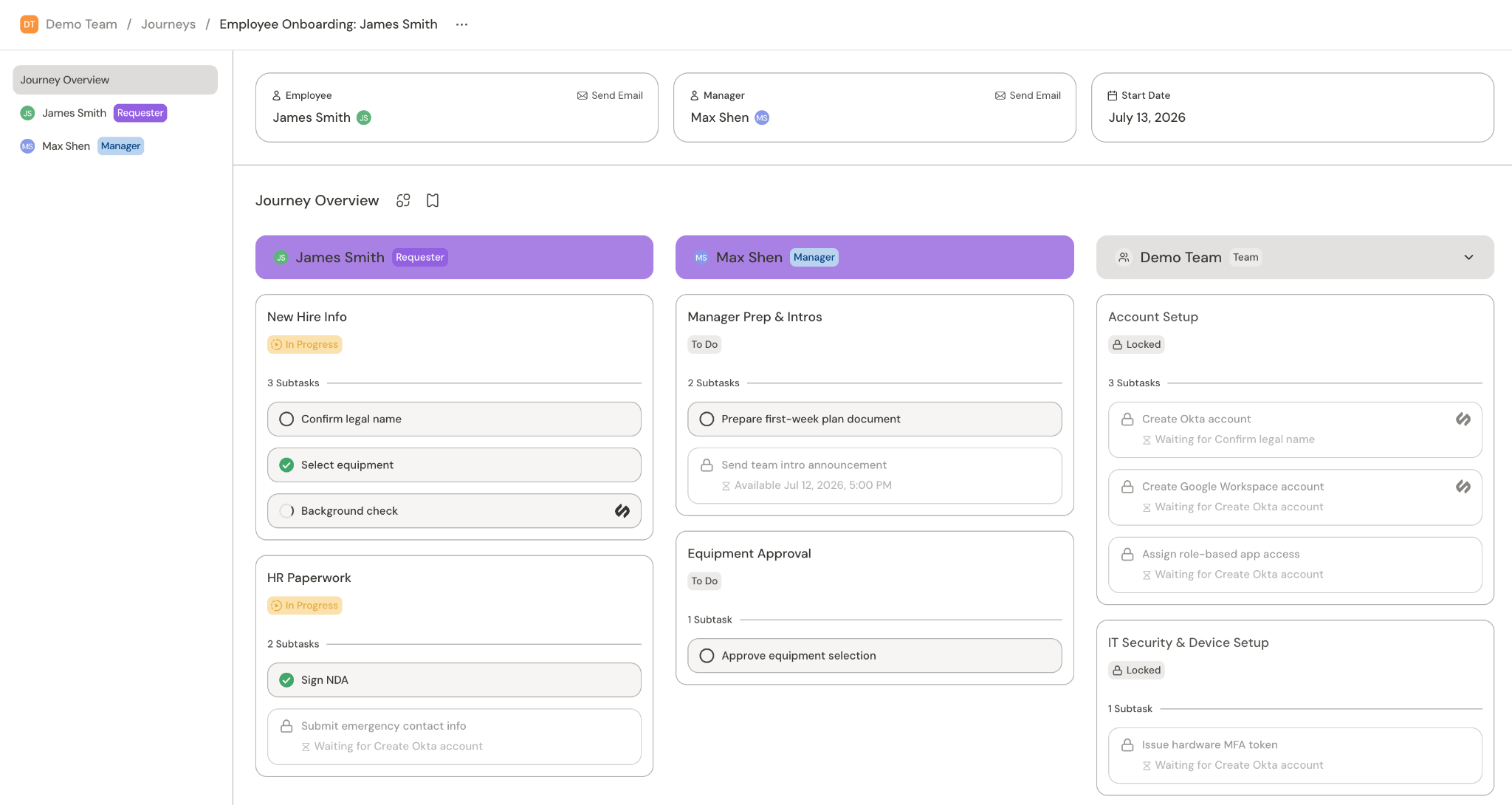
A *journey* is a multi-step, structured process built around the person at its center (e.g., a new hire being onboarded, an employee changing roles, someone leaving the company). Instead of a single ticket, a journey coordinates many tasks across many people, in the right order, over days or weeks. Everyone involved gets a view tailored to their role, so they see exactly the tasks that are theirs to do.
## When to use a journey
Use a journey to manage a process when that process has one or more of these characteristics:
* **Multiple tasks in a specific order**: steps that must happen in sequence, not all at once.
* **Different inputs at different times**: information that's collected in stages rather than up front.
* **Multiple stakeholders/teams**: work that's split across an employee, their manager, IT, and other teams.
* **Time-based steps**: a task that shouldn't start until a certain date (for example, "send first-day instructions the morning they start").
* **Dependent tasks**: a task that can't begin until another one finishes, whether that earlier task has the same assignee or a different one.
> If the process is a single thread of actions, a [workflow](/sections/documentation/workflows/overview) is usually the better fit.
### Example use cases
Provision accounts, assign equipment, schedule training, and walk a new hire through first-week tasks.
Revoke access, collect devices, and hand off responsibilities when someone leaves.
Manage access, tooling, and the overall process for promotions or internal transfers.
The example use cases are common in IT and HR operations, but a journey works for any structured, multi-step process your team owns.
## Key concepts
A journey consists of [**tasks**](/sections/documentation/ticketing/ticket-configuration/tasks) split among multiple parties, including the **requester** (e.g. the new hire), **stakeholders** (e.g. their hiring manager), and Serval **teams** (e.g. IT and HR teams). More complex employee onboarding journeys may include additional stakeholders, such as a skip-level manager.
A task could be a form submission (e.g. filling in contact info), an automated workflow (e.g. creating an Okta account for a new hire), or a manual step (e.g. verifying I-9 documentation). Tasks can be gated by time (e.g. I-9 verification is gated by the employee's start date) or dependent tasks (e.g. Okta account creation is gated on contact info).
 ## How to get started
> Enable Journeys per team under **Settings → Capabilities**. When it's off, that team's sidebar hides the section.
### Install a pre-built journey
Serval offers Installable journeys out of the box.
1. Navigate to **Journeys** from the team sidebar
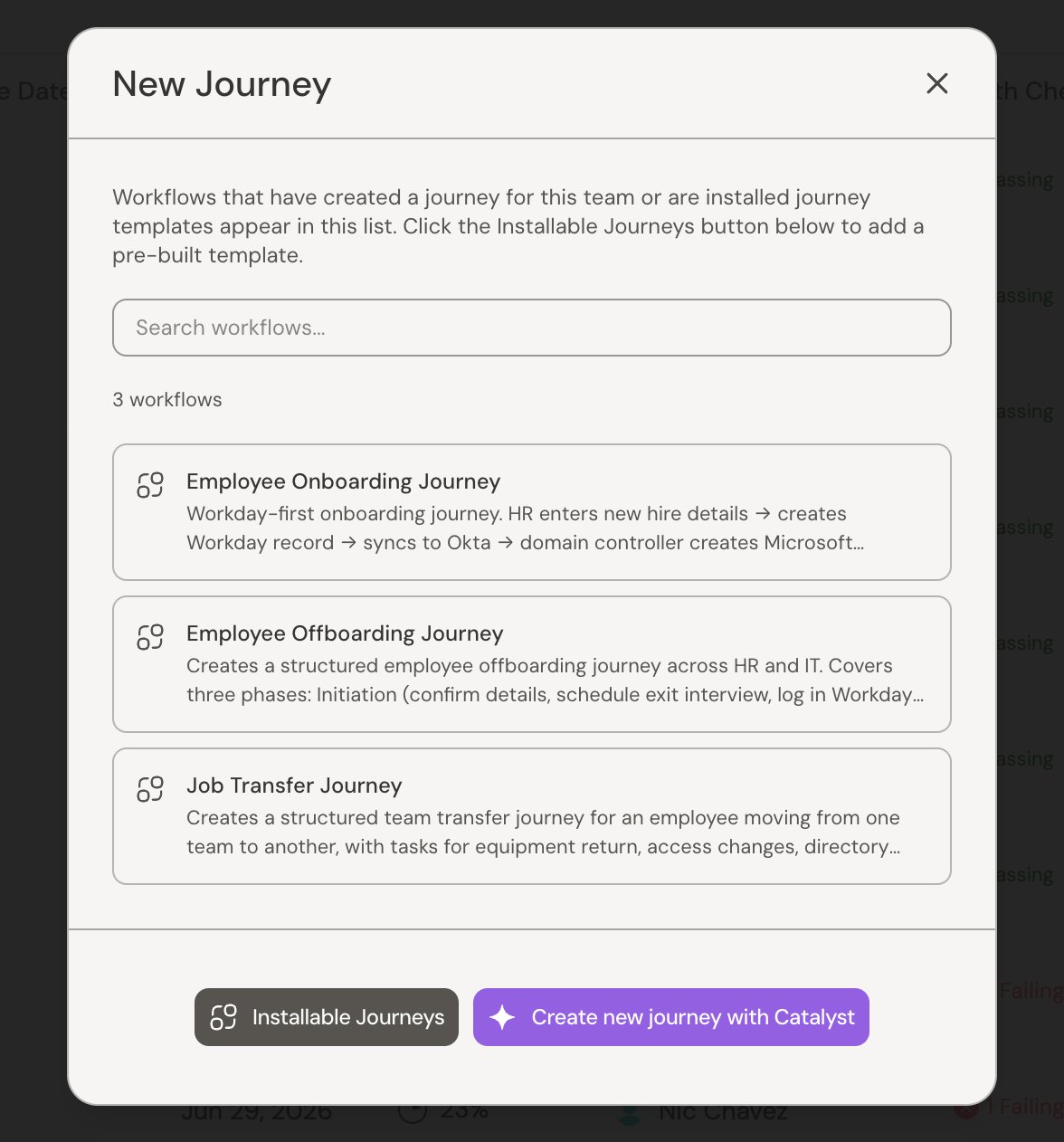
2. Click **New Journey**
3. Click **Installable Journeys** and add them to your environment
### Build a new journey
We recommend using Catalyst to build new journeys that can be triggered by your team or an HRIS event. Open a chat directly from the **Catalyst** tab, describe the journey, and Catalyst drafts it for you.
For more information, see [Building journeys with Catalyst](/sections/documentation/catalyst/journeys).
### Running journeys
**From a trigger:** A journey can be triggered automatically by an event from an external system, such as a new-hire record appearing in Workday. For how to set up an automated trigger, see [Building journeys with Catalyst](/sections/documentation/catalyst/journeys).
**From the UI:** Whether you installed a pre-built journey or built your own, they will appear in the **New Journey** dialog. Select any available journey, fill in any required inputs, and submit.
## How to get started
> Enable Journeys per team under **Settings → Capabilities**. When it's off, that team's sidebar hides the section.
### Install a pre-built journey
Serval offers Installable journeys out of the box.
1. Navigate to **Journeys** from the team sidebar
2. Click **New Journey**
3. Click **Installable Journeys** and add them to your environment
### Build a new journey
We recommend using Catalyst to build new journeys that can be triggered by your team or an HRIS event. Open a chat directly from the **Catalyst** tab, describe the journey, and Catalyst drafts it for you.
For more information, see [Building journeys with Catalyst](/sections/documentation/catalyst/journeys).
### Running journeys
**From a trigger:** A journey can be triggered automatically by an event from an external system, such as a new-hire record appearing in Workday. For how to set up an automated trigger, see [Building journeys with Catalyst](/sections/documentation/catalyst/journeys).
**From the UI:** Whether you installed a pre-built journey or built your own, they will appear in the **New Journey** dialog. Select any available journey, fill in any required inputs, and submit.
 ### Archive a journey
To take a finished or abandoned journey off the active list, use **Archive journey** from the journey's actions or from its row actions in the list. An archived journey shows a banner and stays available to **Unarchive** later.
## Related
Overview of journey tasks
How admin and end users view journeys
Use a journey to manage tasks for a team
Onboarding and offboarding patterns for HR and People teams
Design and build journeys in Catalyst
### Archive a journey
To take a finished or abandoned journey off the active list, use **Archive journey** from the journey's actions or from its row actions in the list. An archived journey shows a banner and stays available to **Unarchive** later.
## Related
Overview of journey tasks
How admin and end users view journeys
Use a journey to manage tasks for a team
Onboarding and offboarding patterns for HR and People teams
Design and build journeys in Catalyst