> ## Documentation Index
> Fetch the complete documentation index at: https://docs.serval.com/llms.txt
> Use this file to discover all available pages before exploring further.
# Monitor and manage journeys
> Track every journey from the team Journeys page, open a single journey, and manage its tasks
**Journeys is in open beta** and the product is actively evolving.
As an admin, you manage journeys from the **Journeys** page, which lists every journey for the team. The **Journey Overview** opens a single journey and its tasks.
## The team Journeys page
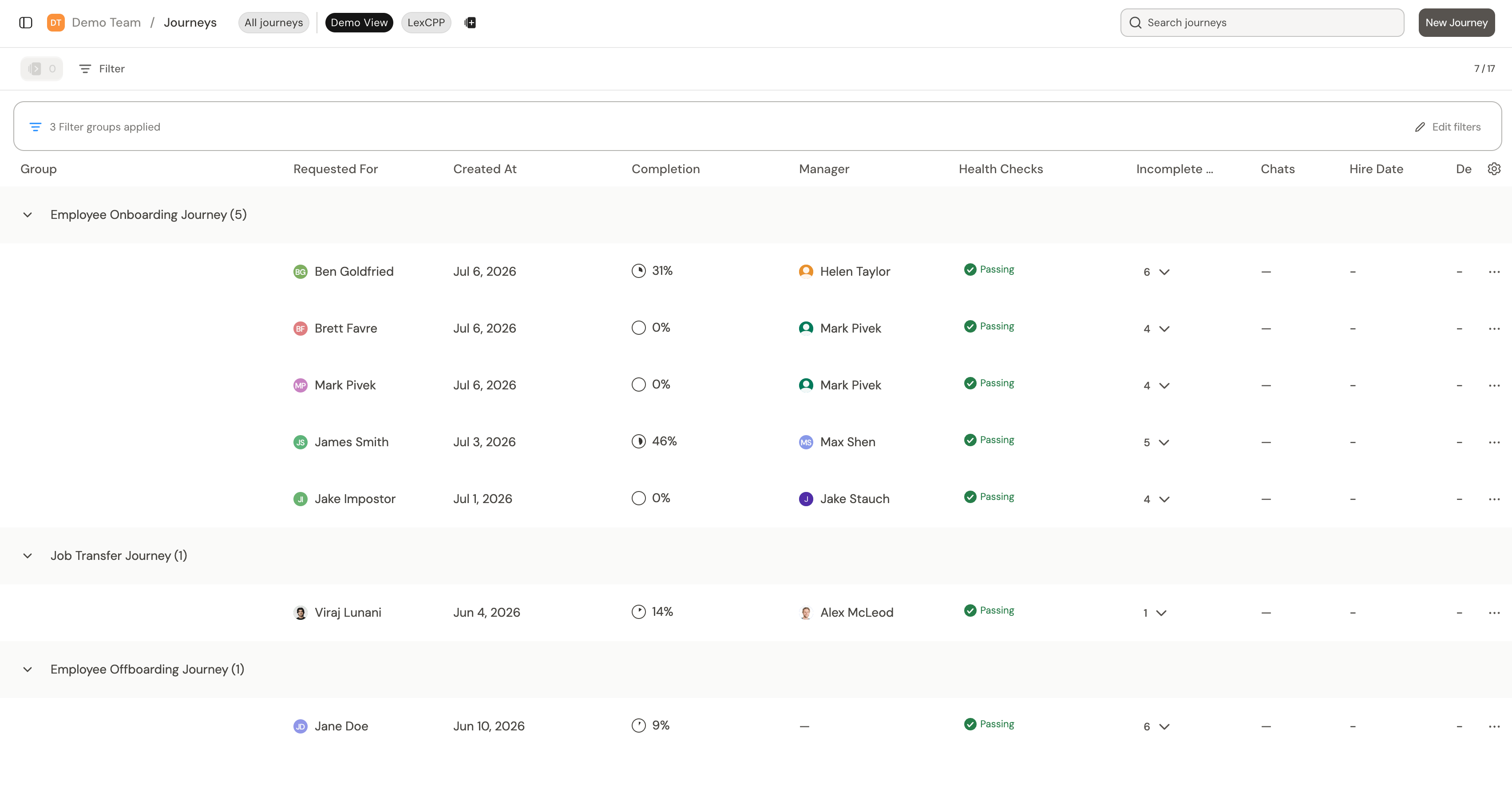
Open **Journeys** in the team sidebar to see every journey for the team. It opens to the **All journeys** view, and you can save your own filtered views beside it. Use the search box to find a journey by name.
 ### Default columns
The **All journeys** view shows these columns by default:
| Column | What it shows |
| :------------------- | :---------------------------------------------------------------------------------------------------------------------------------------------------------------------------------------------------------------------------------------------------------------------------------------------------------------------------------------------------------------------------------------------------------------------------------------------------------------------------- |
| **Requested For** | The person the journey is for. |
| **Journey Type** | The journey template this run came from |
| **Due Date** | When the journey is due |
| **Created At** | When the journey started |
| **Completion** | How far along the journey is |
| **Stakeholder** | The stakeholder(s) tied to the journey |
| **Health Checks** | **No badge displayed -** Health check data isn't available yet. This is common for a new journey that hasn't started and has tasks with no due dates. **Passing -** The journey has at least one health check, and no tasks are failing, denied, or overdue. Checks that are running or don't yet have data don't block **Passing**. **Warning -** No failures, but one or more tasks in the journey are overdue. **Failing -** One or more tasks have failed or were denied. |
| **Incomplete Steps** | The unlocked steps still open |
| **Chats** | Active chats on the journey |
### Custom fields as columns
Since journeys are a type of ticket, you can add custom fields such as location, department, or cost center. Any custom field on the journey ticket type can appear as its own column in the **All journeys** view. Add these columns to sort and filter on data beyond the defaults.
You configure custom fields for journeys under **Settings → Ticket type → Journeys**
## The Journey Overview
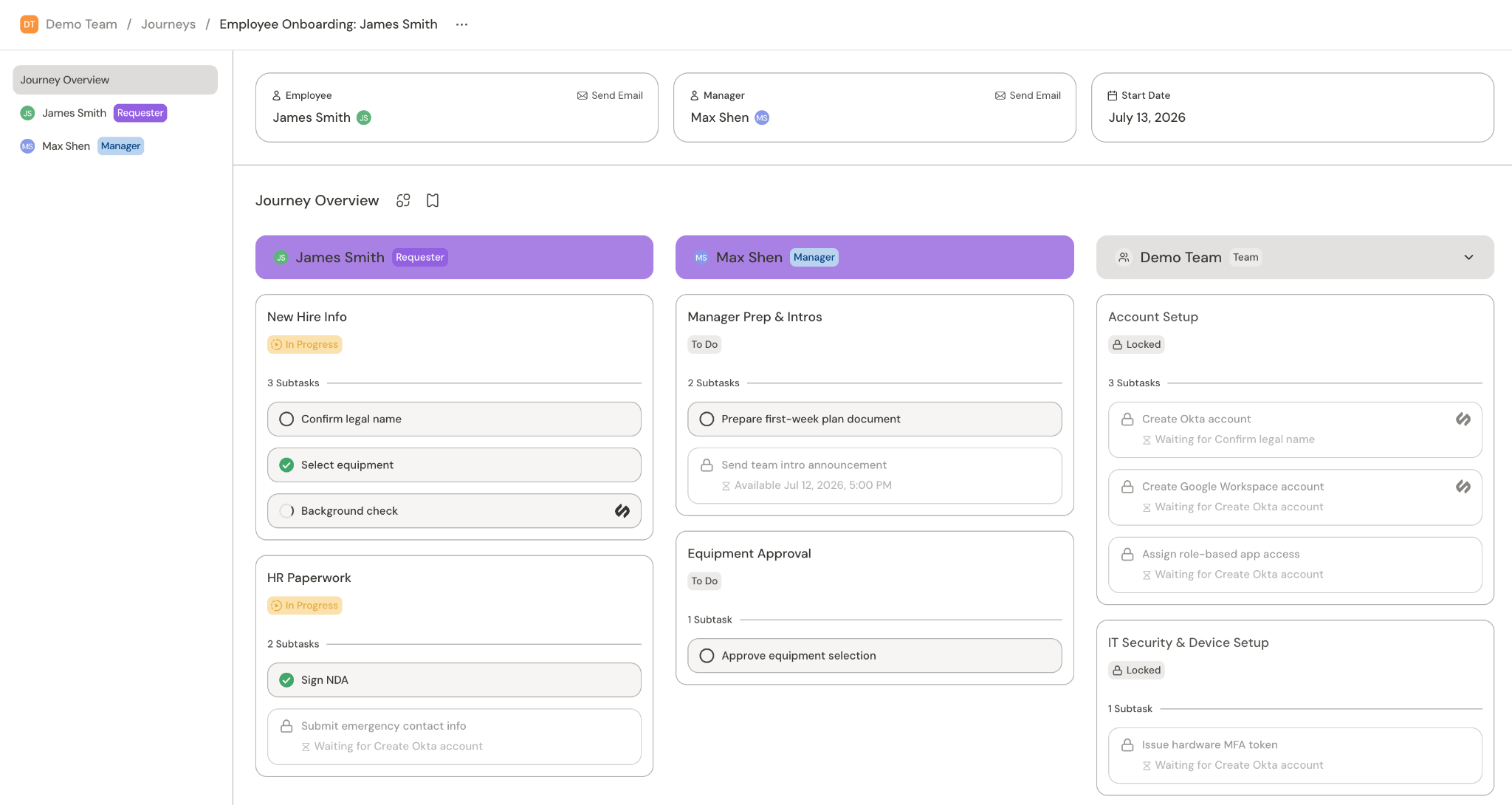
Select a journey to open its overview page. The journey overview shows every task categorized under the requester, stakeholders, and teams involved.
### Default columns
The **All journeys** view shows these columns by default:
| Column | What it shows |
| :------------------- | :---------------------------------------------------------------------------------------------------------------------------------------------------------------------------------------------------------------------------------------------------------------------------------------------------------------------------------------------------------------------------------------------------------------------------------------------------------------------------- |
| **Requested For** | The person the journey is for. |
| **Journey Type** | The journey template this run came from |
| **Due Date** | When the journey is due |
| **Created At** | When the journey started |
| **Completion** | How far along the journey is |
| **Stakeholder** | The stakeholder(s) tied to the journey |
| **Health Checks** | **No badge displayed -** Health check data isn't available yet. This is common for a new journey that hasn't started and has tasks with no due dates. **Passing -** The journey has at least one health check, and no tasks are failing, denied, or overdue. Checks that are running or don't yet have data don't block **Passing**. **Warning -** No failures, but one or more tasks in the journey are overdue. **Failing -** One or more tasks have failed or were denied. |
| **Incomplete Steps** | The unlocked steps still open |
| **Chats** | Active chats on the journey |
### Custom fields as columns
Since journeys are a type of ticket, you can add custom fields such as location, department, or cost center. Any custom field on the journey ticket type can appear as its own column in the **All journeys** view. Add these columns to sort and filter on data beyond the defaults.
You configure custom fields for journeys under **Settings → Ticket type → Journeys**
## The Journey Overview
Select a journey to open its overview page. The journey overview shows every task categorized under the requester, stakeholders, and teams involved.
 > For more information, see [Admin and end user views](/sections/documentation/journeys/views).
## Manage tasks
Select any [task](/sections/documentation/journeys/tasks) to open it. A task with subtasks expands to its steps, and each step opens to its own detail.
### Manage workflow runs
When a task runs a workflow, its detail gives you controls for that run. Hover over the task to reveal them:
> For more information, see [Admin and end user views](/sections/documentation/journeys/views).
## Manage tasks
Select any [task](/sections/documentation/journeys/tasks) to open it. A task with subtasks expands to its steps, and each step opens to its own detail.
### Manage workflow runs
When a task runs a workflow, its detail gives you controls for that run. Hover over the task to reveal them:
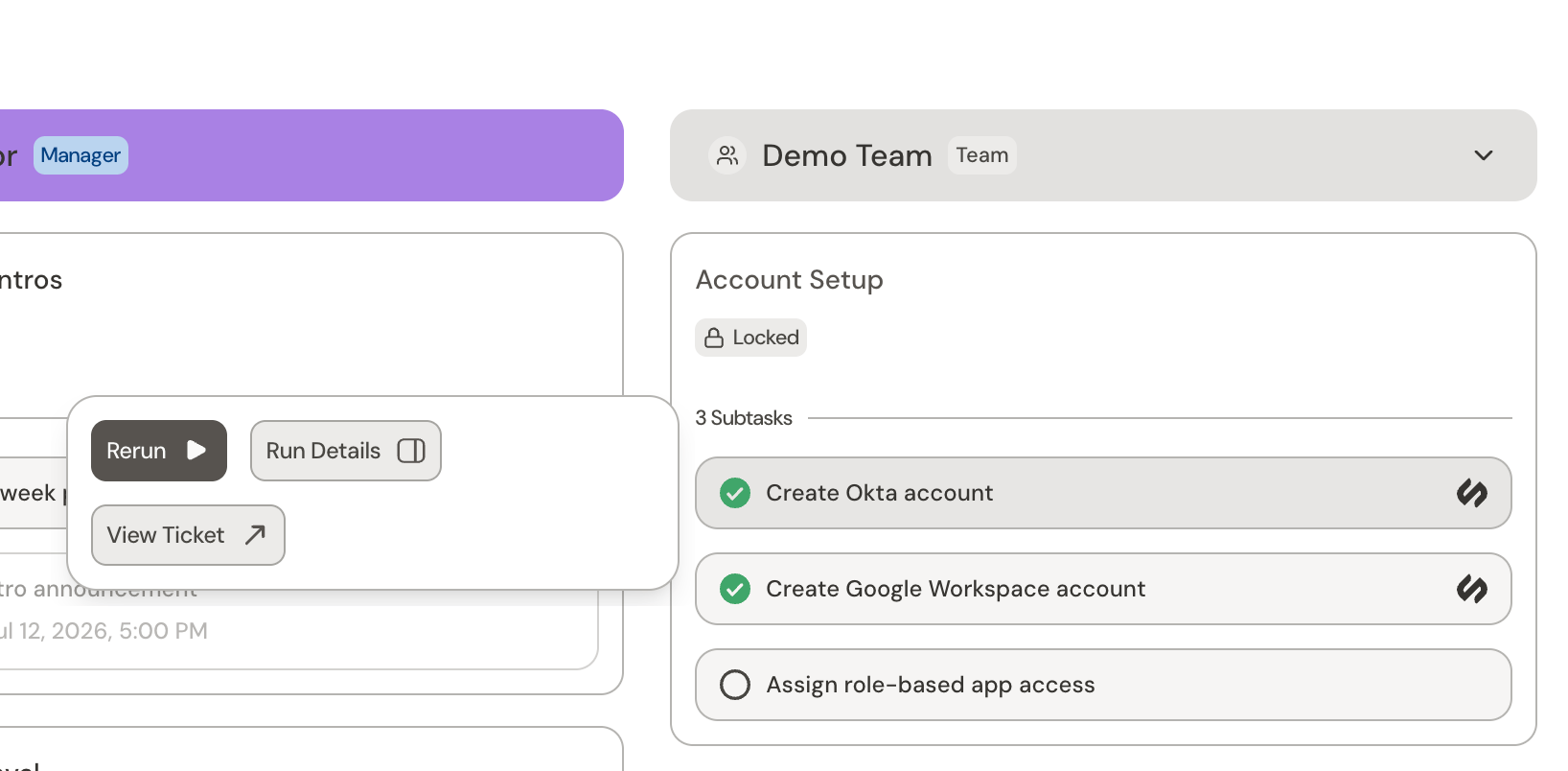 * **Run Details** opens the workflow run so you can see what happened.
* **Retry** re-attempts a failed or canceled run after you fix the cause.
* **Rerun** runs a finished workflow again from the start.
> **Rerun** starts the workflow over from the beginning, and any actions it already took may happen again.
### Complete a manual task
A manual task has no attached workflow, so the assignee completes it by hand. Use **Mark complete** to finish it, and **Reopen** to reverse that.
> Only admins can mark a workflow-driven task done by hand. Its status follows the workflow.
### Open the underlying ticket
Every task has an underlying ticket. Use **View Ticket** from the task to open it when you need the full conversation, custom fields, or history behind a step.
### Reading task status
For more information, see [Task states](/sections/documentation/journeys/tasks#task-states)
## Related
What journeys are and how the pieces fit together
Overview of journey tasks
How admin and end users view journeys
Use a journey to manage tasks for a team
The automations behind form and automated tasks
Design and build journeys in Catalyst
* **Run Details** opens the workflow run so you can see what happened.
* **Retry** re-attempts a failed or canceled run after you fix the cause.
* **Rerun** runs a finished workflow again from the start.
> **Rerun** starts the workflow over from the beginning, and any actions it already took may happen again.
### Complete a manual task
A manual task has no attached workflow, so the assignee completes it by hand. Use **Mark complete** to finish it, and **Reopen** to reverse that.
> Only admins can mark a workflow-driven task done by hand. Its status follows the workflow.
### Open the underlying ticket
Every task has an underlying ticket. Use **View Ticket** from the task to open it when you need the full conversation, custom fields, or history behind a step.
### Reading task status
For more information, see [Task states](/sections/documentation/journeys/tasks#task-states)
## Related
What journeys are and how the pieces fit together
Overview of journey tasks
How admin and end users view journeys
Use a journey to manage tasks for a team
The automations behind form and automated tasks
Design and build journeys in Catalyst