> ## Documentation Index
> Fetch the complete documentation index at: https://docs.serval.com/llms.txt
> Use this file to discover all available pages before exploring further.
# Cross-team journeys
> A journey can hand out tasks to multiple Serval teams
**Journeys is in open beta** and the product is actively evolving.
A journey often spans more than one team. One team owns the journey, but its individual tasks can belong to other teams, so a single journey orchestrates work across HR, IT, Finance, and Facilities at once.
For example, consider employee onboarding: An HR-owned onboarding journey can hand laptop provisioning to IT and badge access to Facilities. HR manages the process, and the journey tracks the whole thing end to end.
## How it appears in the overview
On a cross-team journey, the **Journey Overview** shows one column per team involved. The owning team's column comes first, followed by a column for each other team that owns work.
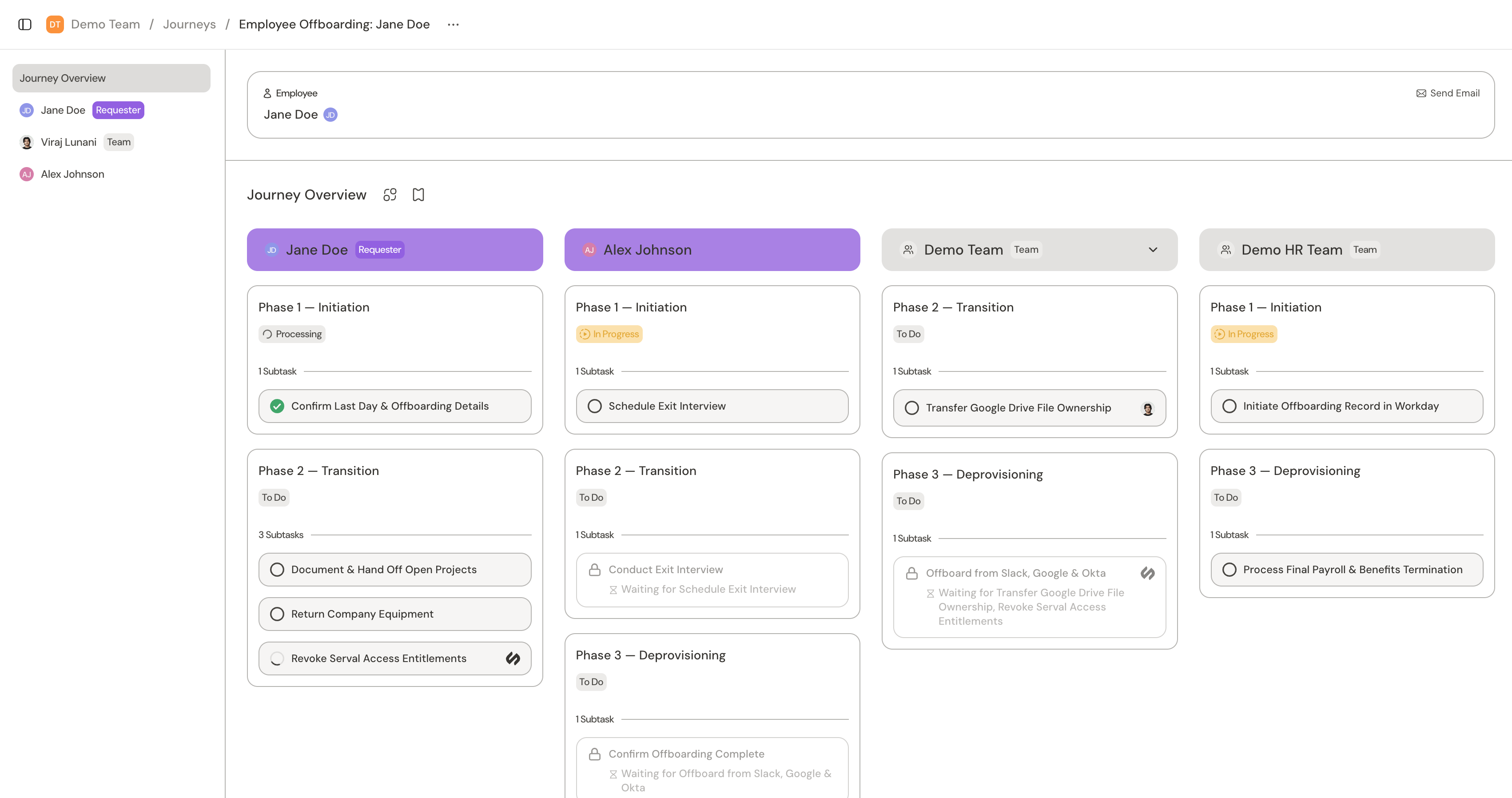 Each team column carries its own filter. When a column has more than one person acting in it, you can filter it by **All**, **System**, **Unassigned**, or a specific member to focus on the tasks you care about.
## Access is per team
Everyone involved sees the whole journey, but you act only on your own team's slice of it. You can only work on a task (e.g. submit its form, retry a run, open **Run Details**) in teams where you can manage journey tasks. In every other team's column, tasks are view-only: you can open them and follow progress, but you can't act on them.
This keeps each team in control of its own work. IT owns the provisioning tasks, Facilities owns badge access, and neither can submit on the other's behalf, even though both watch the same journey move forward.
## Building cross-team journeys
A journey builder assigns a task to another team, and that task then uses the other team's published workflows and runs inside that team. The task still belongs to the journey, so it shows up in the journey's overview and counts toward completion like any other task.
The full mechanics (e.g. assigning a task's team, referencing that team's workflows, and routing the work) live in the [Building journeys guide](/sections/documentation/catalyst/journeys).
## Related
What journeys are and how the pieces fit together
Overview of journey tasks
How admin and end users view journeys
Design and build journeys in Catalyst
Each team column carries its own filter. When a column has more than one person acting in it, you can filter it by **All**, **System**, **Unassigned**, or a specific member to focus on the tasks you care about.
## Access is per team
Everyone involved sees the whole journey, but you act only on your own team's slice of it. You can only work on a task (e.g. submit its form, retry a run, open **Run Details**) in teams where you can manage journey tasks. In every other team's column, tasks are view-only: you can open them and follow progress, but you can't act on them.
This keeps each team in control of its own work. IT owns the provisioning tasks, Facilities owns badge access, and neither can submit on the other's behalf, even though both watch the same journey move forward.
## Building cross-team journeys
A journey builder assigns a task to another team, and that task then uses the other team's published workflows and runs inside that team. The task still belongs to the journey, so it shows up in the journey's overview and counts toward completion like any other task.
The full mechanics (e.g. assigning a task's team, referencing that team's workflows, and routing the work) live in the [Building journeys guide](/sections/documentation/catalyst/journeys).
## Related
What journeys are and how the pieces fit together
Overview of journey tasks
How admin and end users view journeys
Design and build journeys in Catalyst