> ## Documentation Index
> Fetch the complete documentation index at: https://docs.serval.com/llms.txt
> Use this file to discover all available pages before exploring further.
# Create a form
> Describe a form to Catalyst, preview it live, and publish it to the service catalog.
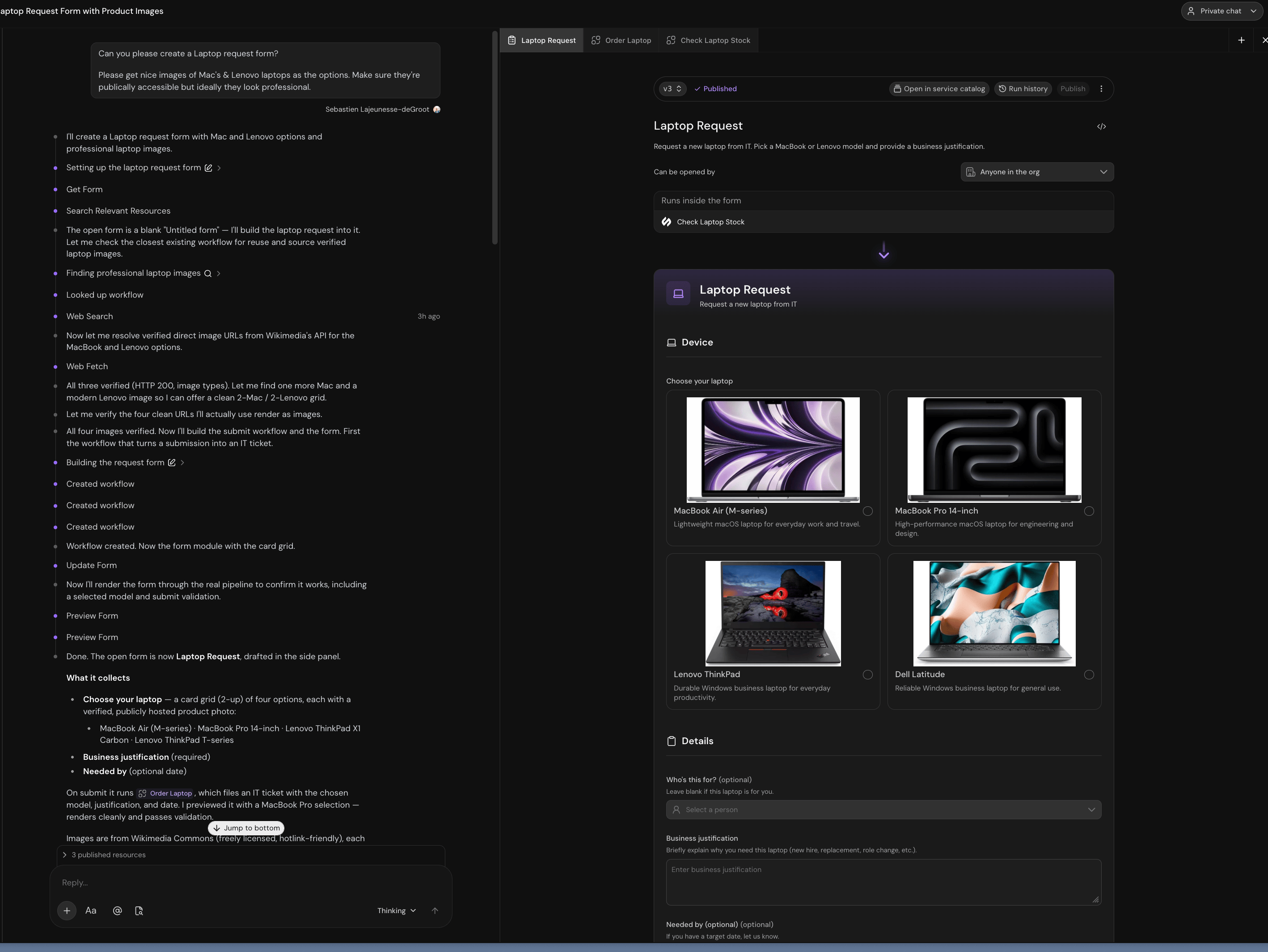 ## Build it
Go to **Service Management → Forms → New form**. Serval creates an **Untitled form** and opens the workspace.
Be specific about the questions, the options, and what happens on submit:
> Create a laptop request form. Options should be MacBook Air, MacBook Pro 14-inch, Lenovo ThinkPad, and Dell Latitude, shown as cards with product photos. Require a business justification. Let people optionally say who it's for and when they need it. On submit, file an IT ticket with the chosen model.
Keep talking to Catalyst: "make the justification field longer," "only ask for a manager if it's for someone else." Each change re-renders the preview.
Name the form before publishing. The name is what employees see in the catalog and what the Help Desk Agent reads to decide the form fits a request. "Laptop Request" beats "IT Form 2."
## The workspace
| Area | What it does |
| :-------------------------- | :------------------------------------------------------------------------------------------------------------------------------- |
| **Preview** | The real form, rendered by the real engine |
| **Can be opened by** | Which employees may open and submit it. See [audience](/sections/documentation/forms/share-and-fill#control-who-can-open-a-form) |
| **Runs inside the form** | Workflows called while the form is open, to fetch live data |
| **Runs on submit** | The workflow that receives the answers |
| **Version selector** | Switch versions, and see which one is published |
| **Publish** | Deploys the current draft |
| **Run history** | Every session, and the runs it started |
| **Open in service catalog** | The published form, exactly as employees see it |
| **Code (``)** | The form's source |
## Preview and publish
The preview is a live session against your draft. Conditional fields appear, validation fires, and live-data workflows run.
A preview submit runs the latest submit workflow **for real**, even as an unpublished draft. It doesn't publish your drafts, but side effects still happen: a ticket, provisioned access, a message.
Edits autosave to a draft. The action bar shows **Unpublished changes** when your draft differs from what's live. Click **Publish** to deploy it.
Publishing never disturbs a submission in progress. A session stays on the version it opened against.
If a publish fails, the error names the problem in the code: an unknown option, an invalid icon name, a workflow reference that doesn't resolve.
## The code behind a form
Catalyst writes it, and most builders never open it. It's under the `` button when you want it.
```tsx theme={null}
import { view, field, Form } from "serval/forms";
import orderLaptop from "@serval/workflows/order-laptop";
export const main = view({
fn: () => {
const [model, Model] = field.cards("model", [
{ value: "mba", label: "MacBook Air (M-series)", description: "Lightweight macOS laptop for everyday work and travel." },
{ value: "mbp", label: "MacBook Pro 14-inch", description: "High-performance macOS laptop for engineering and design." },
], { label: "Choose your laptop" });
const [justification, Justification] = field.text("justification", {
label: "Business justification",
multiline: true,
maxLength: 500,
});
return (
);
},
});
```
* **`field.(key, …)`**: declares a question, returns `[value, Component]`
* **`
## Build it
Go to **Service Management → Forms → New form**. Serval creates an **Untitled form** and opens the workspace.
Be specific about the questions, the options, and what happens on submit:
> Create a laptop request form. Options should be MacBook Air, MacBook Pro 14-inch, Lenovo ThinkPad, and Dell Latitude, shown as cards with product photos. Require a business justification. Let people optionally say who it's for and when they need it. On submit, file an IT ticket with the chosen model.
Keep talking to Catalyst: "make the justification field longer," "only ask for a manager if it's for someone else." Each change re-renders the preview.
Name the form before publishing. The name is what employees see in the catalog and what the Help Desk Agent reads to decide the form fits a request. "Laptop Request" beats "IT Form 2."
## The workspace
| Area | What it does |
| :-------------------------- | :------------------------------------------------------------------------------------------------------------------------------- |
| **Preview** | The real form, rendered by the real engine |
| **Can be opened by** | Which employees may open and submit it. See [audience](/sections/documentation/forms/share-and-fill#control-who-can-open-a-form) |
| **Runs inside the form** | Workflows called while the form is open, to fetch live data |
| **Runs on submit** | The workflow that receives the answers |
| **Version selector** | Switch versions, and see which one is published |
| **Publish** | Deploys the current draft |
| **Run history** | Every session, and the runs it started |
| **Open in service catalog** | The published form, exactly as employees see it |
| **Code (``)** | The form's source |
## Preview and publish
The preview is a live session against your draft. Conditional fields appear, validation fires, and live-data workflows run.
A preview submit runs the latest submit workflow **for real**, even as an unpublished draft. It doesn't publish your drafts, but side effects still happen: a ticket, provisioned access, a message.
Edits autosave to a draft. The action bar shows **Unpublished changes** when your draft differs from what's live. Click **Publish** to deploy it.
Publishing never disturbs a submission in progress. A session stays on the version it opened against.
If a publish fails, the error names the problem in the code: an unknown option, an invalid icon name, a workflow reference that doesn't resolve.
## The code behind a form
Catalyst writes it, and most builders never open it. It's under the `` button when you want it.
```tsx theme={null}
import { view, field, Form } from "serval/forms";
import orderLaptop from "@serval/workflows/order-laptop";
export const main = view({
fn: () => {
const [model, Model] = field.cards("model", [
{ value: "mba", label: "MacBook Air (M-series)", description: "Lightweight macOS laptop for everyday work and travel." },
{ value: "mbp", label: "MacBook Pro 14-inch", description: "High-performance macOS laptop for engineering and design." },
], { label: "Choose your laptop" });
const [justification, Justification] = field.text("justification", {
label: "Business justification",
multiline: true,
maxLength: 500,
});
return (
);
},
});
```
* **`field.(key, …)`**: declares a question, returns `[value, Component]`
* **`