> ## Documentation Index
> Fetch the complete documentation index at: https://docs.serval.com/llms.txt
> Use this file to discover all available pages before exploring further.
# Provisioning Methods
> Configure how access is granted to your applications and resources
Provisioning methods determine how Serval grants access once a request is approved. Choose the method that best fits your technical setup and security requirements.
***
## Understanding Provisioning Method Selection
### The Four Provisioning Methods
Serval offers four ways to grant access:
| Method | How it works | Best for | Speed |
| -------------------- | ---------------------------------------- | -------------------------------------- | -------------------------------------------- |
| **Linked Groups** | Adds user to IdP group; IdP syncs to app | Apps connected to your IdP with SCIM | Depends on IdP sync (minutes to hours) |
| **Direct** | Serval calls app API directly | Apps with robust APIs, not in IdP | Seconds - configurable when importing a role |
| **Custom Workflows** | Multi-step automation you build | Complex provisioning with dependencies | Varies by workflow |
| **Manual** | Creates task for human to complete | Apps without automation options | Depends on human response |
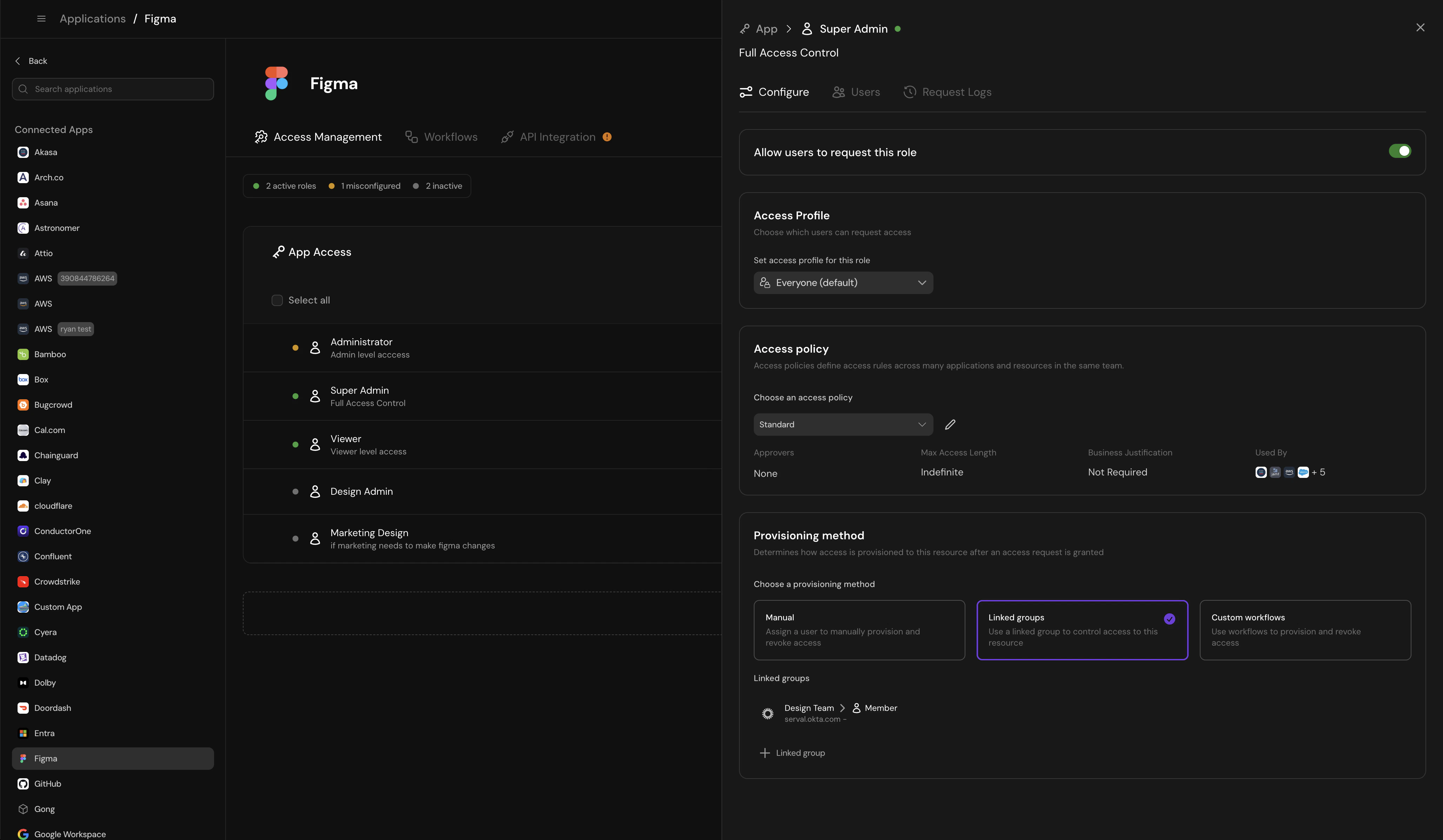 ### Common Provisioning Scenarios
**Best method:** Linked Groups
**Why:** Simple app-level access, likely already using Okta or similar IdP for SSO
**Setup:**
1. Create "App-Asana-Users" group in Okta
2. Configure Okta to provision Asana based on group membership
3. In Serval, link the "Member" role to this Okta group
4. When users request Asana access, Serval adds them to the group
5. Okta syncs the change to Asana (typically within 15 minutes)
6. When access expires, Serval removes them from the group
**Best method:** Direct provisioning or Custom Workflow
**Why:** GitHub teams are resources within GitHub, not separate apps
**Setup with Direct:**
1. Create "Engineering" as a custom resource in Serval
2. Configure "Member" and "Maintainer" roles with direct provisioning
3. Serval uses GitHub API to add/remove users from the team
4. Access granted in seconds
**Setup with Workflow (if you need approval notifications):**
1. Create workflow that calls GitHub API to add user
2. Send Slack notification to team lead
3. On expiration, call API to remove user
**Best method:** Custom Workflow
**Why:** Multi-step process with dependencies
**Setup:**
1. User requests AWS access
2. Workflow creates Linear task: "Purchase AWS license"
3. Workflow opens GitHub PR to Terraform config
4. Workflow waits for Linear task completion
5. Auto-merge PR when task marked done
6. Apply Terraform to grant actual AWS access
**Best method:** Manual Provisioning
**Why:** No automation possible yet
**Setup:**
1. Configure manual provisioning with clear instructions
2. Assign tasks to tool owner
3. Owner manually adds user in the tool
4. Owner marks task complete in Serval
5. For temporary access, Serval creates removal task when access expires
**Plan to automate:** As request volume grows, consider building a custom workflow with the tool's database or building an API.
### Different Provisioning Strategies in a Single Application
You can use different provisioning methods for different roles in the same application.
**Example: GitHub**
* **App-level "Member" access** → Linked Groups (via Okta)
* **Team-specific "Maintainer" access** → Direct provisioning (via GitHub API)
* **Organization "Owner" access** → Manual provisioning (too sensitive to automate)
This approach balances automation for common requests with control for sensitive access.
***
## Linked Groups
Access granted by adding the user to a group in your Identity Provider (Okta, Google, Rippling, Entra). When access expires, the user is automatically removed.
### How It Works
User requests access and it's approved per the access policy
Serval automatically adds the user to the specified IdP group
Your IdP's existing rules provision the actual application access
When access expires, Serval removes the user from the IdP group
**Example:** Add the user to the "GitHub-Engineering" group in Okta. Okta's SCIM integration then grants GitHub access. After seven days, Serval removes the user from the group.
### When to Use Linked Groups
* Your IdP already provisions access via groups
* You want automatic cleanup when access expires
* You need audit trails in your IdP
* You're managing access to multiple apps with one group
* The application doesn't integrate with your IdP
* You need more complex provisioning logic
* Group membership would grant too much access
***
## Custom Workflow
Access granted through a custom process—like using an API to send an email invite or opening a GitHub PR for a Terraform change.
### How It Works
You define a workflow that Serval executes when access is granted. Workflows can include multiple steps, conditional logic, and integrations with various tools. Read more about how to set up [custom access workflows here](https://docs.serval.com/sections/access-management/configuration/custom-access-provisioning).
### Examples
Add or remove users from a GitHub team that controls repository access.
**Steps:**
1. Use GitHub API to add user to team
2. Send Slack notification to user and team lead
3. On expiration, remove user from team
Open a GitHub PR for Terraform group membership, create a Linear task to purchase a license, auto-merge the PR when the task is complete.
**Steps:**
1. Create Linear task: "Purchase AWS license for \[user]"
2. Open GitHub PR to add user to Terraform AWS group
3. Wait for Linear task completion
4. Auto-merge GitHub PR
5. Apply Terraform to grant actual AWS access
Coordinate access across multiple systems during employee onboarding.
**Steps:**
1. Create accounts in internal apps
2. Send welcome email with credentials
3. Add to Slack channels
4. Create onboarding tasks in project management tool
5. Schedule follow-up check-in with manager
### When to Use Custom Workflows
* You need multi-step provisioning processes
* Access requires API calls to multiple systems
* You want to coordinate with other tools (Linear, GitHub, etc.)
* Your provisioning logic has conditional branches
* A simpler method (Linked Groups or Direct) would work
* You're not comfortable building workflows
* The process is entirely manual anyway
***
## Direct Provisioning
Pre-built API provisioning for common applications. Serval uses the application's API to grant access directly.
### How It Works
User requests access and it's approved per the access policy
Serval makes an API call directly to the application to grant the specified role
The user receives access within seconds, no manual intervention needed
When access expires, Serval calls the API again to revoke access
**Example:** When a user requests Ramp admin access, Serval automatically calls the Ramp API to grant the admin role. After the access period expires, Serval revokes it via the same API.
### Supported Applications
Direct provisioning is available for select applications with robust APIs.
### When to Use Direct Provisioning
* The application supports direct provisioning in Serval
* You want fully automated provisioning without IdP groups
* The application isn't connected to your IdP
* You need immediate access grants
* The application doesn't support direct provisioning yet
* You prefer provisioning through IdP groups for consistency
***
## Manual Provisioning
Access granted through a task assigned to the application owner (via ticket or Slack). A human manually grants the access.
### How It Works
User requests access and it's approved per the access policy
Serval creates a task in your ticketing system or Slack assigned to the application owner
The assigned person manually grants access in the application
The owner marks the task complete in Serval
If access is temporary, Serval creates another task to remove access when it expires
**Example:** Jeff requests editor access to Linear. Serval creates a ticket assigned to the Linear admin. The admin adds Jeff as an editor and marks the task complete. For 12-hour temporary access, Serval creates a second task 12 hours later to remove Jeff's access.
### When to Use Manual Provisioning
* The application has no API or IdP integration
* Provisioning requires human judgment
* The process is very infrequent
* You're still building automation
* You have high-volume access requests
* Faster automated methods are available
* Manual intervention creates bottlenecks
***
## Choosing the Right Method
Use this decision tree to select the best provisioning method:
**Yes** → Use **Linked Groups**
* Most auditable approach
* Works across multiple apps consistently
* Best for apps your entire company uses
**No** → Continue to next step
**Yes** → Use **Direct Provisioning**
* Fully automated
* Access granted in seconds
* No IdP dependency
**No** → Continue to next step
**Yes** → Use **Custom Workflow**
* Most flexible option
* Can coordinate across multiple systems
* Handles complex approval chains
* Requires workflow building skills
**No** → Continue to next step
Use **Manual Provisioning** when:
* No automation options are available yet
* Access requests are infrequent (\< 5 per month)
* You're building automation but aren't ready yet
**Important:** Document clear instructions for the person granting access. Plan to automate as request volume grows.
### Start Simple, Then Automate
Don't feel pressure to automate everything immediately. A pragmatic approach:
1. **Week 1:** Set up manual provisioning for all apps to establish the request → approval flow
2. **Week 2:** Convert high-volume apps to Linked Groups or Direct provisioning
3. **Month 2:** Build custom workflows for complex provisioning scenarios
4. **Ongoing:** Automate manual processes as volume increases
Manual provisioning today is better than delayed automation that never ships.
***
## Best Practices
Use clear naming conventions for groups linked to Serval roles. Pattern: `App-[ApplicationName]-[RoleName]`
Examples: `App-GitHub-Members`, `App-Asana-Admins`, `App-Figma-Editors`
This makes it obvious which groups are managed by access requests and easier to audit.
Start with Linked Groups or Direct Provisioning when possible. They scale better and reduce manual work.
Linked Groups provide the best audit trail and work across multiple applications simultaneously.
If you must use manual provisioning, write clear instructions for the person who will grant access.
Start with manual provisioning if needed, but plan to build workflows or integrations as volume grows.
The same method that provisions access must deprovision it. If you use a custom workflow to grant access, make sure it can also revoke access cleanly when time expires. Test the full lifecycle, not just the grant.
### Common Provisioning Scenarios
**Best method:** Linked Groups
**Why:** Simple app-level access, likely already using Okta or similar IdP for SSO
**Setup:**
1. Create "App-Asana-Users" group in Okta
2. Configure Okta to provision Asana based on group membership
3. In Serval, link the "Member" role to this Okta group
4. When users request Asana access, Serval adds them to the group
5. Okta syncs the change to Asana (typically within 15 minutes)
6. When access expires, Serval removes them from the group
**Best method:** Direct provisioning or Custom Workflow
**Why:** GitHub teams are resources within GitHub, not separate apps
**Setup with Direct:**
1. Create "Engineering" as a custom resource in Serval
2. Configure "Member" and "Maintainer" roles with direct provisioning
3. Serval uses GitHub API to add/remove users from the team
4. Access granted in seconds
**Setup with Workflow (if you need approval notifications):**
1. Create workflow that calls GitHub API to add user
2. Send Slack notification to team lead
3. On expiration, call API to remove user
**Best method:** Custom Workflow
**Why:** Multi-step process with dependencies
**Setup:**
1. User requests AWS access
2. Workflow creates Linear task: "Purchase AWS license"
3. Workflow opens GitHub PR to Terraform config
4. Workflow waits for Linear task completion
5. Auto-merge PR when task marked done
6. Apply Terraform to grant actual AWS access
**Best method:** Manual Provisioning
**Why:** No automation possible yet
**Setup:**
1. Configure manual provisioning with clear instructions
2. Assign tasks to tool owner
3. Owner manually adds user in the tool
4. Owner marks task complete in Serval
5. For temporary access, Serval creates removal task when access expires
**Plan to automate:** As request volume grows, consider building a custom workflow with the tool's database or building an API.
### Different Provisioning Strategies in a Single Application
You can use different provisioning methods for different roles in the same application.
**Example: GitHub**
* **App-level "Member" access** → Linked Groups (via Okta)
* **Team-specific "Maintainer" access** → Direct provisioning (via GitHub API)
* **Organization "Owner" access** → Manual provisioning (too sensitive to automate)
This approach balances automation for common requests with control for sensitive access.
***
## Linked Groups
Access granted by adding the user to a group in your Identity Provider (Okta, Google, Rippling, Entra). When access expires, the user is automatically removed.
### How It Works
User requests access and it's approved per the access policy
Serval automatically adds the user to the specified IdP group
Your IdP's existing rules provision the actual application access
When access expires, Serval removes the user from the IdP group
**Example:** Add the user to the "GitHub-Engineering" group in Okta. Okta's SCIM integration then grants GitHub access. After seven days, Serval removes the user from the group.
### When to Use Linked Groups
* Your IdP already provisions access via groups
* You want automatic cleanup when access expires
* You need audit trails in your IdP
* You're managing access to multiple apps with one group
* The application doesn't integrate with your IdP
* You need more complex provisioning logic
* Group membership would grant too much access
***
## Custom Workflow
Access granted through a custom process—like using an API to send an email invite or opening a GitHub PR for a Terraform change.
### How It Works
You define a workflow that Serval executes when access is granted. Workflows can include multiple steps, conditional logic, and integrations with various tools. Read more about how to set up [custom access workflows here](https://docs.serval.com/sections/access-management/configuration/custom-access-provisioning).
### Examples
Add or remove users from a GitHub team that controls repository access.
**Steps:**
1. Use GitHub API to add user to team
2. Send Slack notification to user and team lead
3. On expiration, remove user from team
Open a GitHub PR for Terraform group membership, create a Linear task to purchase a license, auto-merge the PR when the task is complete.
**Steps:**
1. Create Linear task: "Purchase AWS license for \[user]"
2. Open GitHub PR to add user to Terraform AWS group
3. Wait for Linear task completion
4. Auto-merge GitHub PR
5. Apply Terraform to grant actual AWS access
Coordinate access across multiple systems during employee onboarding.
**Steps:**
1. Create accounts in internal apps
2. Send welcome email with credentials
3. Add to Slack channels
4. Create onboarding tasks in project management tool
5. Schedule follow-up check-in with manager
### When to Use Custom Workflows
* You need multi-step provisioning processes
* Access requires API calls to multiple systems
* You want to coordinate with other tools (Linear, GitHub, etc.)
* Your provisioning logic has conditional branches
* A simpler method (Linked Groups or Direct) would work
* You're not comfortable building workflows
* The process is entirely manual anyway
***
## Direct Provisioning
Pre-built API provisioning for common applications. Serval uses the application's API to grant access directly.
### How It Works
User requests access and it's approved per the access policy
Serval makes an API call directly to the application to grant the specified role
The user receives access within seconds, no manual intervention needed
When access expires, Serval calls the API again to revoke access
**Example:** When a user requests Ramp admin access, Serval automatically calls the Ramp API to grant the admin role. After the access period expires, Serval revokes it via the same API.
### Supported Applications
Direct provisioning is available for select applications with robust APIs.
### When to Use Direct Provisioning
* The application supports direct provisioning in Serval
* You want fully automated provisioning without IdP groups
* The application isn't connected to your IdP
* You need immediate access grants
* The application doesn't support direct provisioning yet
* You prefer provisioning through IdP groups for consistency
***
## Manual Provisioning
Access granted through a task assigned to the application owner (via ticket or Slack). A human manually grants the access.
### How It Works
User requests access and it's approved per the access policy
Serval creates a task in your ticketing system or Slack assigned to the application owner
The assigned person manually grants access in the application
The owner marks the task complete in Serval
If access is temporary, Serval creates another task to remove access when it expires
**Example:** Jeff requests editor access to Linear. Serval creates a ticket assigned to the Linear admin. The admin adds Jeff as an editor and marks the task complete. For 12-hour temporary access, Serval creates a second task 12 hours later to remove Jeff's access.
### When to Use Manual Provisioning
* The application has no API or IdP integration
* Provisioning requires human judgment
* The process is very infrequent
* You're still building automation
* You have high-volume access requests
* Faster automated methods are available
* Manual intervention creates bottlenecks
***
## Choosing the Right Method
Use this decision tree to select the best provisioning method:
**Yes** → Use **Linked Groups**
* Most auditable approach
* Works across multiple apps consistently
* Best for apps your entire company uses
**No** → Continue to next step
**Yes** → Use **Direct Provisioning**
* Fully automated
* Access granted in seconds
* No IdP dependency
**No** → Continue to next step
**Yes** → Use **Custom Workflow**
* Most flexible option
* Can coordinate across multiple systems
* Handles complex approval chains
* Requires workflow building skills
**No** → Continue to next step
Use **Manual Provisioning** when:
* No automation options are available yet
* Access requests are infrequent (\< 5 per month)
* You're building automation but aren't ready yet
**Important:** Document clear instructions for the person granting access. Plan to automate as request volume grows.
### Start Simple, Then Automate
Don't feel pressure to automate everything immediately. A pragmatic approach:
1. **Week 1:** Set up manual provisioning for all apps to establish the request → approval flow
2. **Week 2:** Convert high-volume apps to Linked Groups or Direct provisioning
3. **Month 2:** Build custom workflows for complex provisioning scenarios
4. **Ongoing:** Automate manual processes as volume increases
Manual provisioning today is better than delayed automation that never ships.
***
## Best Practices
Use clear naming conventions for groups linked to Serval roles. Pattern: `App-[ApplicationName]-[RoleName]`
Examples: `App-GitHub-Members`, `App-Asana-Admins`, `App-Figma-Editors`
This makes it obvious which groups are managed by access requests and easier to audit.
Start with Linked Groups or Direct Provisioning when possible. They scale better and reduce manual work.
Linked Groups provide the best audit trail and work across multiple applications simultaneously.
If you must use manual provisioning, write clear instructions for the person who will grant access.
Start with manual provisioning if needed, but plan to build workflows or integrations as volume grows.
The same method that provisions access must deprovision it. If you use a custom workflow to grant access, make sure it can also revoke access cleanly when time expires. Test the full lifecycle, not just the grant.